DISCLAIMER! The project is just a reference in order to show our possibilities and should be carefully adopted and tested before implementing for production.
In this How-to guide we will show you how use OpenCV to find the contours on the image and convert them to Dynamic CNC path in ctrlX PLC Engineering. It may be used for dispensing applications, for example glue dispensing in Garment industry.
Prerequisites:
ctrlX CORE X3/X5/X7/Virtual (2.X.X / 3.X.X)
Ubuntu 22.04 LTS build environment
(e.g. standalone Ubuntu, App-Build-Environment of ctrlX WORKS, QEMU or Virtual machine)ctrlX AUTOMATION SDK
Understanding of ctrlX Data Layer provider and client
Knowledge how to communicate with external cameras
Basic CODESYS Softmotion knowledge
Here we will not focus on ctrlX Data Layer part and using cameras, please refer to 'YOLO Instance Segmentation Vision app with HAILO and ONNX Runtime support' , where it's already described in detail. Furthermore the Snapcraft.yaml and flask part can be also reused from this How-to.
1. Contour processing
Assuming you've followed the steps to integrate Hikrobot, Basler, USB cameras or go with preloaded image, prepared snapcraft.yaml and Frontend interface, we can go directly to contour processing. The main parameters that you will have to control are:
'erode_cont', which will set the erosion of the contour, to dispense inside the object contour, but not on the contour itself
'point_resol', which will set, how many points of the contour to track. The smaller is the value, the more points will be stored in our array and shared with PLC
Full function code is available in Related Links section.
What it does:
Get the image stored in ctrlX CORE internal storage
Convert it to grayscale
Apply threshold
Erodes the contour
Finds all contours in the image
Takes points based on points resolution to reduce the amount of total points
Uses a 9999999 separator to distinguish different contours in the image
Negates y coordinate
Forms array of x and y coordinates to send it to PLC through ctrlX Data Layer
After that you use your ctrlX Data Layer Client to share the data for processing in PLC, same as we did it in the other guide.
Build the snap!
2. Points extraction
Full PLC Project is also available through the Related Links.
First create a project in ctrlX PLC Engineering and enable Softmotion, we assume you already know how to do that.
Create a program to read values from your ctrlX Data Layer nodes
Another option would be to make your PLC provider and just use a client in Python snap.
I also perform some checks of the coordinates to find the end points of contours and detect corrupted data.
3. Form Dynamic CNC Path
Read the array formed from extracted ctrlX Data Layer data, filter the points, and copy them into xp[] and yp[] arrays for CNC path
Add a Z - axis to handle up and down movement to move between contours
Append the points of the Path with the SMC_AppendObj function
Add the functions SMC_SmoothPath, SMC_SmoothMerge and SMC_CheckVelocities for smoothing
4. SMC_Interpolator
That's it, now just create a program with a simple SMC interpolator and MC_Power function blocks to enable the drives and link it to our variable GVL.runTask for automatic executing of the motion after the path is formed:
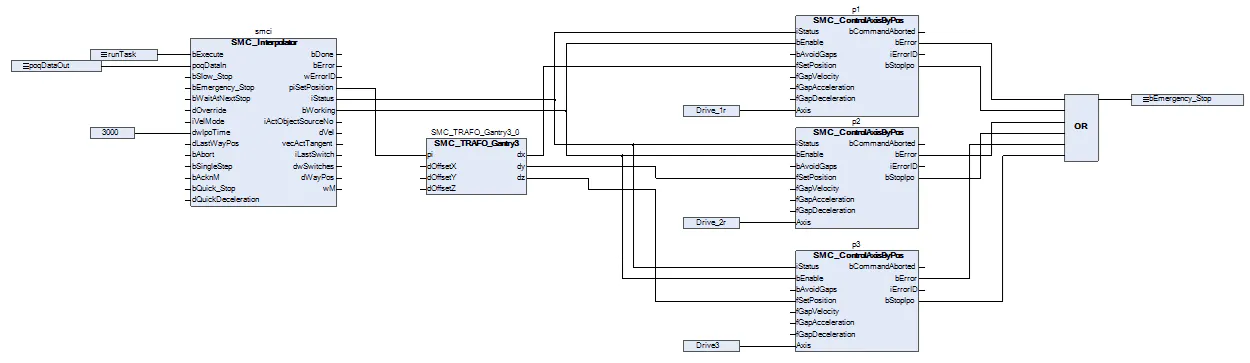
5. Running
Now you can run the application
Have fun!
Related Links:
GitHub - boschrexroth/ctrlx-automation-sdk: ctrlX AUTOMATION Software Development Kit
https://github.com/AKRA-off/ctrlx-os-snap-collection/tree/main/Ctrlx-contour-cnc-path
https://github.com/AKRA-off/ctrlx-os-snap-collection/tree/main/Ctrlx-contour-cnc-path/PLC
Create and delete files and folders in Active configuration
Python snap to stream USB webcam images to ctrlX Data Layer
Hikrobot - Machine Vision - Service - Download Center
YOLO Instance Segmentation Vision app with HAILO and ONNX Runtime support
