HistoryContentRequirementsQuick Startup in 3 MinutesPublic API Reference of JS classescxApi (Session & REST Manager)cxSubscription (Event Client)Integrate Subscription in web based visualizationThe IFrame Security HurdlesDirect Controller HostingBackground informationSSE protocol used by ctrlX OS for subscriptionsRelated LinksDownloads
History
24 Sept 2026 Initial release
Content
This article describes how to subscribe to ctrlX Data Layer nodes in an HTML document or in HMI systems (HELIO, WebIQ) with JavaScript support. General descriptions and further information can be found in our online documentation.
Requirements
ctrlX OS device, ctrlX CORE or ctrlX COREvirtual
HTML and JavaScript know how
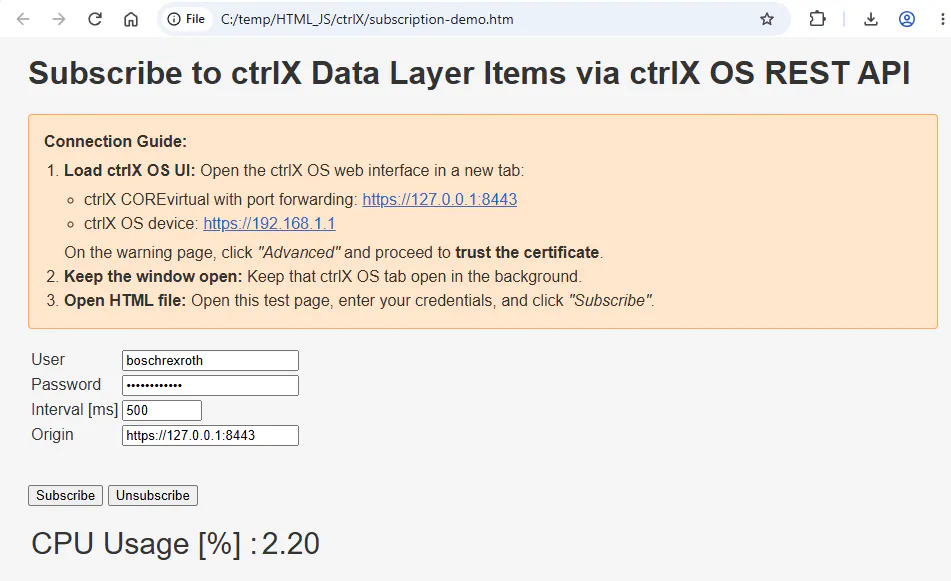
For an easy startup, download subscription-demo.zip (see chapter Downloads) it contains:
subscription-demo.htm - A simple HTML page that subscribes to two data layer items
cxApi.js – Contains two JS classes
cxApi - Manages authentication
cxSubscription - Manages the subscription
Quick Startup in 3 Minutes
Add a new data layer item.
Search for text #1# and uncomment the text shown below.<!-- #1# --> <tr><td>Available Memory [MB] :</td><td id="Mem_free">-------</td></tr>Register the Node Path in the Map
Search for text #2# and uncomment the text shown below.
Currently, two arguments are stored in nodeToRef:
* ref: reference to the HTML output element
* digits: number of digits to display
To implement unit conversion, for example, you can add a suitable parameter here, which then needs to be interpreted in functionsetValues(). Search for #3#<!-- #2# --> nodeToRef.set("framework/metrics/system/memavailable-mb", { ref: document.getElementById("Mem_free"), digits: 2 });Open HTML file and follow the displayed instructions
HTML demo page with subscription
Public API Reference of JS classes
Detailed parameters and type structures are declared in JSDoc within the source code. Here is the big picture:
cxApi (Session & REST Manager)
startSession(...): Establishes session, validates and automatically manages token caching in browser sessionStorage.
ping(...): Fast, lightweight availability check.
Dev Tip: Essential to quickly verify if your connection is blocked by CORS/SSL, or if your ctrlX COREvirtual shut down its services (which happens automatically after 4 hours).
myFetch(...): Robust fetch helper. Intercepts HTTP 401 (Unauthorized) errors, silently re-authenticates via startSession, and automatically retries the original request once.
stopSession(): Destroys active session on the controller and wipes browser session storage.
cxSubscription (Event Client)
start(...): Subscribes to the data layer paths and processes the SSE stream.
stop(): Safely closes the active stream and releases reader locks.
Integrate Subscription in web based visualization
If the subscriptions are used in a web based visualization, different security restrictions apply compared to our test environment. This applies both to the use of iframes and to usage within JavaScript.
The IFrame Security Hurdles
Embedding your local HMI in an <iframe> forces the browser to apply strict boundaries:
Cross-Origin Mismatch (CORS): If the parent portal (e.g., https://my-hmi-portal.local) and your embedded HMI (e.g., file:///index.html) run on different origins, the browser blocks direct background communication to the ctrlX OS REST API.
Sandbox Restrictions: Many frame containers use the <iframe sandbox="..."> attribute. If crucial sandbox bypass flags such as allow-scripts or allow-same-origin are missing, Javascript runtime execution and storage access (sessionStorage) are completely disabled.
Direct Controller Hosting
The most robust solution is hosting your HMI files directly on the ctrlX OS internal Web Server.
See article: HowTo view content from multiple web servers in one web page (reverse proxy)
Why it works: The HMI runs on the exact same origin as the API.
The Benefit: Direct "Same-Origin" scenario. CORS blocks are bypassed, SSL credentials are automatically trusted because you are already logged in to the control portal, and the IFrame has native access to the browsers sessionStorage with zero security exceptions required
WebIQ and HELIO use the ctrlX OS reverse proxy.
CoDeSys WebVisu does not yet use the reverse proxy, but it will soon.
Background information
SSE protocol used by ctrlX OS for subscriptions
Server-Sent Events (SSE): A unidirectional, standard HTTP/HTTPS-based streaming protocol. ctrlX OS pushes values only on-change, eliminating continuous HTTP-polling overhead.
Metadata Filtering: The raw network stream includes comment lines (such as :keep-alive sent to prevent browser timeouts) and double newline dividers (\n\n). Our backend client parses and discards them dynamically.
Here an example of JSON Data Schema sent from ctrlX OS. Each valid update is sent on a data: line carrying a JSON string:
event: update
id: 2
data: {"node":"framework/metrics/system/cpu-utilisation-percent","timestamp":134320390258319784,"type":"double","value":3.9}

event: update
id: 3
data: {"node":"framework/metrics/system/memavailable-mb","timestamp":134320390258321022,"type":"double","value":1298.07421875}
Related Links
How to subscribe to nodes of the ctrlX Data Layer using REST commands via CURL
Online documentation:
Downloads
