Introduction: What is the OEM App Signing?
By default, the app management in ctrlX OS only allows installation of apps signed by Bosch Rexroth AG. Therefore, all apps in the ctrlX Store are signed. For the apps to get signed they needed to go through a validation process by Bosch Rexroth. To install unsigned apps users can disable this functionality on their ctrlX OS devices which will heavily affect the systems integrity.
To keep the system integrity and to be able to install custom apps without relying on Bosch Rexroth for validation and signing of an own app, the OEM App Signing can be used. The OEM App Signing enables app publishers (e.g. OEMs) to sign own apps for the secure use on their own machines and applications. The OEM can use the OEM App Signing for own apps using his own private key and signed OEM certificate issued by Bosch Rexroth AG. The signed apps can then be installed on the controls where the app publishers App signing certificate was uploaded.
Difference to App Validation and a ctrlX World Partner App
In contrast to the custom self-signing of own apps, it's also possible to purchase the App Validation package or to become a ctrlX World Partner and distribute the app via the ctrlX Store.
In both of these cases an app validation is done by Bosch Rexroth and if the app passes the validation, the app is signed by Bosch Rexroth.
OEM App Signing
App Validation
app is not validated
app is self-signed by the publisher
app is trusted on own ctrlX OS devices (where the public key got uploaded)
app is validated by Bosch Rexroth
app is signed by Bosch Rexroth
app is trusted on every ctrlX OS device
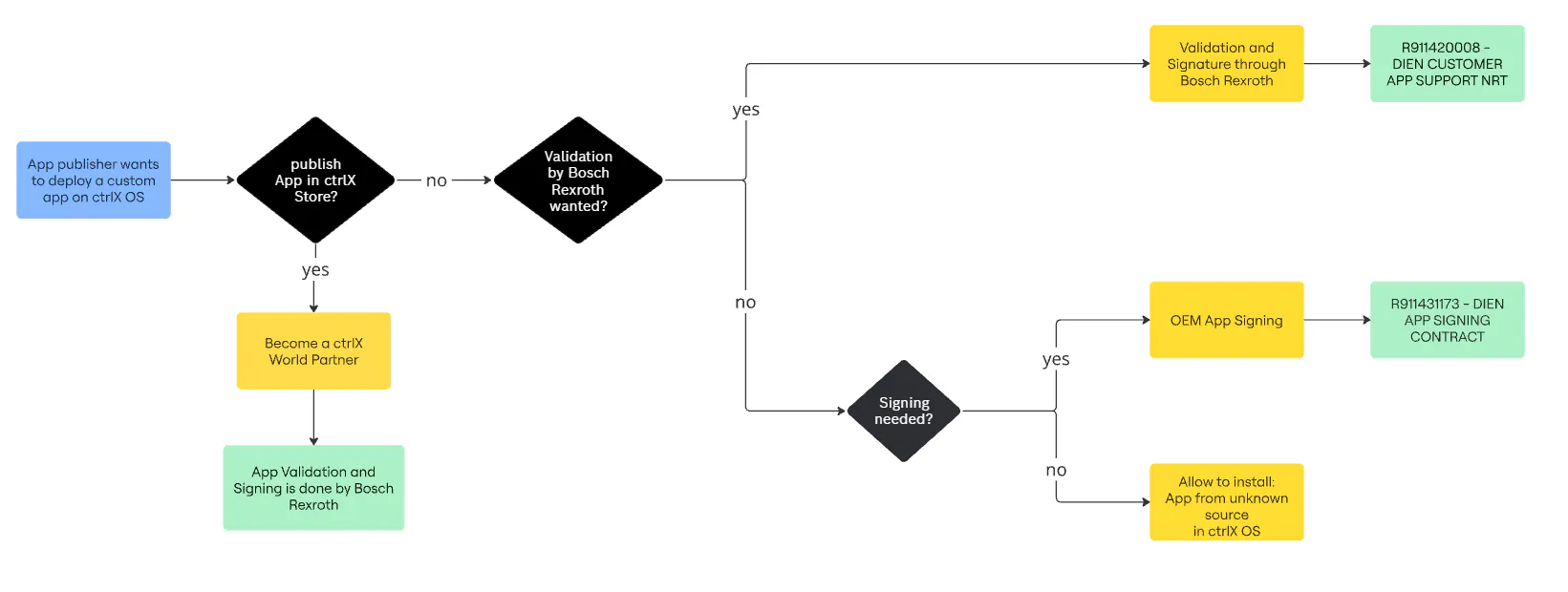
For more information on the App Validation see: Customer App Support Services
For more information on how to become a ctrlX World partner see: ctrlX World - become a partner
Technical steps
A detailed technical documentation and a script which makes it easy to sign custom apps is included in the ctrlX AUTOMATION SDK with Release V4.6. See the technical documentation here: App signing for OEMs
The general steps are the following:
Generate your private signing key
Create a Certificate Signing Request (CSR) for this key. Send this CSR to Bosch Rexroth AG as a signed mail to [email protected]
Bosch Rexroth AG signs the CSR, and sends the Custom OEM App signing certificate back
Sign apps with your private key and OEM app signing certificate
Upload the OEM app signing certificate to your ctrlX OS devices
Now your signed app can be installed
Important Remark: You are responsible for the private signing key. You MUST ensure it is protected according to the state-of-the-art. It is strongly advised to use HSMs for this. In case of loss or leak of the private key, Bosch Rexroth has all rights to revoke the OEM App signing certificate issued for you. As a consequence, your apps might not run any more with future updates of ctrlX OS.
How to get access to OEM App Signing?
The OEM App Signing is based on a yearly subscription and an agreement needs to be signed with Bosch Rexroth prior to using it. For more information contact your sales responsible.
Subscription for 1-year Custom App Signing
R911431173 - DIEN APP SIGNING CONTRACT
