"Never touch a running system."
We’ve all heard it before. In today’s manufacturing landscape, a lack of IT standardization and hard-coded process logic - such as point-to-point communication between the shop floor and IT systems like MES or ERP - make changes costly, time-consuming, and risky.
Introducing the Asset Orchestration Platform (AOP)
AOP increases manufacturing flexibility by decoupling process logic from the control layer. Instead of relying on rigid sequences, process owners can design and adapt production flows graphically. The platform then executes the process—triggering machine functions, gathering data, and routing information across your IT systems and PLCs exactly where and when it’s needed.
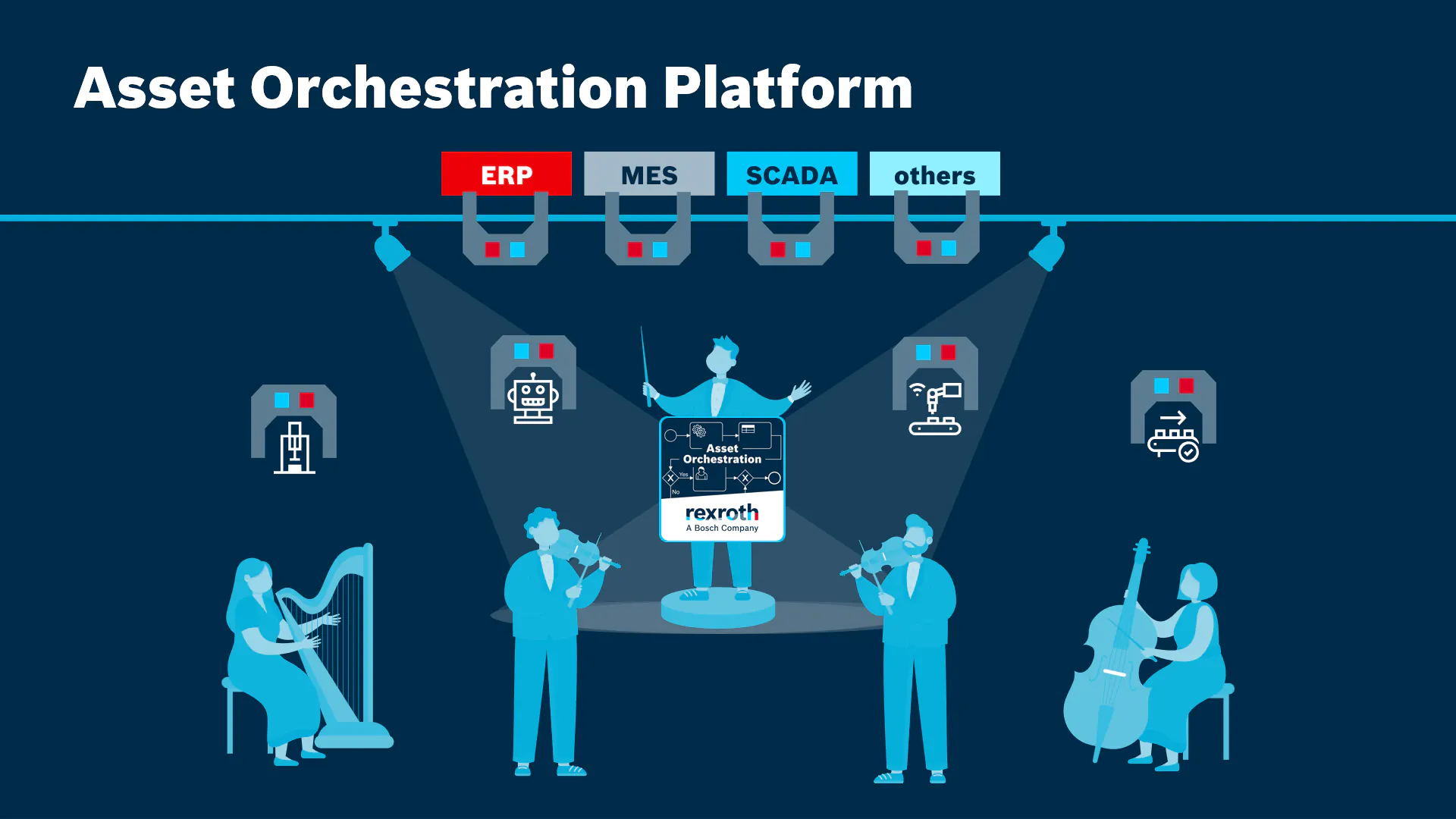
Think of a symphony: instead of musicians, all your machines, PLCs, and IT systems are conducted by a single maestro. Rather than relying on rigid sequences, AOP increases manufacturing flexibility by decoupling your process logic from the control layer. You design your production process graphically, and AOP executes it by the book—triggering machine functions, gathering data, and routing information exactly where and when it’s needed.
By standardizing your brownfield environment and harmonizing how systems provide their data and functions, AOP makes it significantly easier to build, roll out, and scale production applications.
[boschtube src="https://bosch-ext.mediaspace.de.kaltura.com/embed/secure/iframe/entryId/0_snpkdj44/uiConfId/23459231"]
Our Promise to You with Asset Orchestration
Accelerate Process Adaptation: Move changeover and process adjustment efforts from days or weeks to hours. By decoupling logic, AOP can reduce change downtime drastically
Empower Process Experts: Reduce dependency on scarce automation specialists. AOP enables process engineers to visually model and adapt production flows in a governed, graphical environment, freeing up PLC programmers to focus on core machine control.
Simplify Asset Integration: Streamline machine integration and IT/OT connectivity. AOP relies fully on open industry standards, utilizing the Asset Administration Shell (AAS) to create standardized digital twins. This avoids proprietary protocols and reduces the need for custom point-to-point interfaces for new equipment.
Increase Operational Transparency: Gain real-time visibility into complex data flows and production execution. Monitor live process states and KPIs from a central view to support decision-making and future optimizations, such as energy management.
Consolidate the Tool Landscape: Unify process orchestration, operator guidance, and monitoring. Combine workflow authoring, execution, work instructions, and dashboards into a single application, reducing tool fragmentation and maintenance effort.
Regain control of your production flow with a solution that is flexible and reusable by design.
Asset Explorer
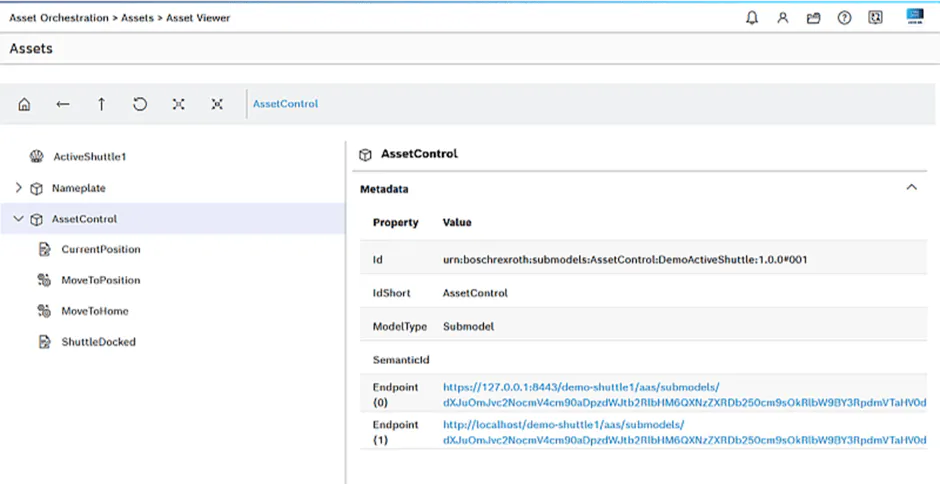
The Asset Explorer provides a unified interface to browse and interact with all connected assets, which are represented as standardized Asset Administration Shells (AAS). It allows users to discover machine capabilities and view their information models, simplifying integration and promoting reuse.
Workflow Editor
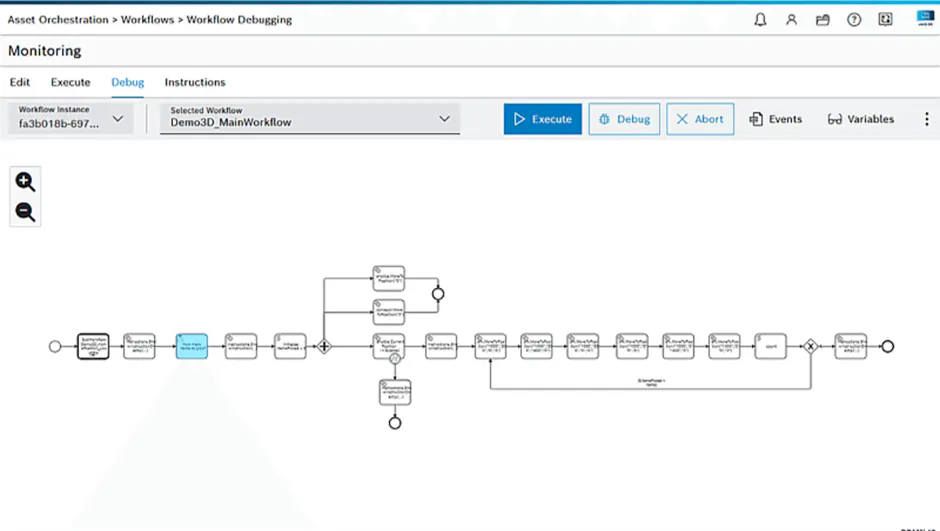
The Workflow Editor provides a visual, browser-based environment for authoring and modifying production processes using the BPMN 2.0 standard. It allows process logic to be graphically modeled, making it transparent and adaptable for process engineers without deep programming expertise
Workflow Monitoring
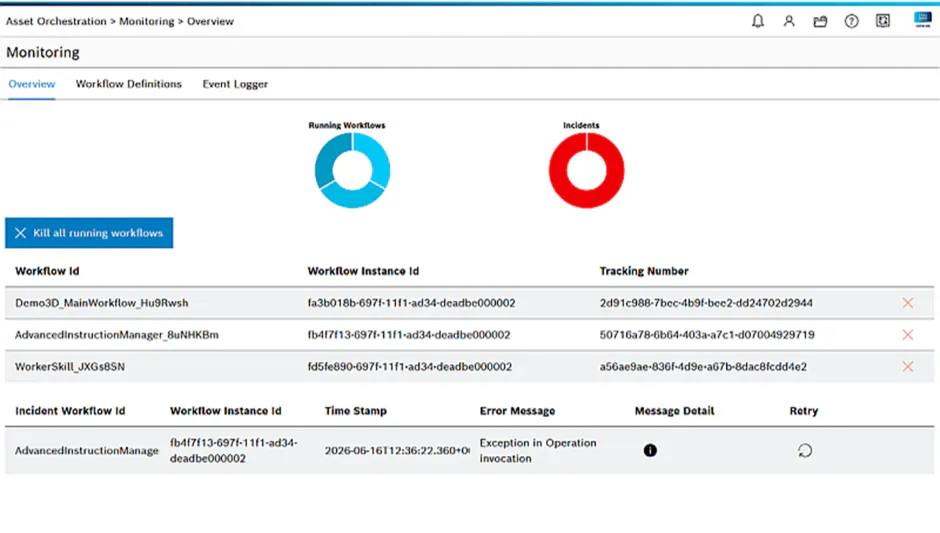
The monitoring offers real-time visibility into executing production processes. It visually overlays live status on process diagrams, lists active and completed instances, and reports incidents. This allows operators and engineers to track progress, diagnose issues, and understand process state.
Instruction Manager
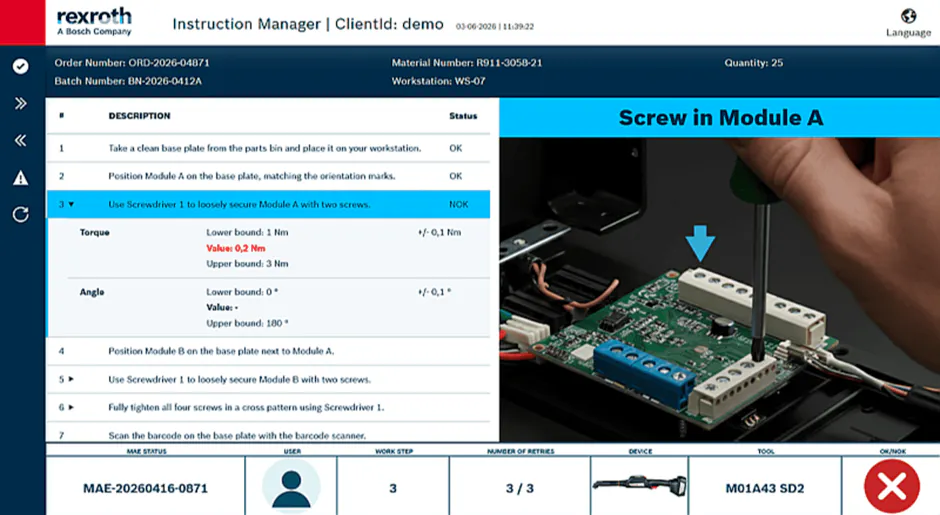
The Instruction Manager allows for the creation, management, and display of digital work instructions for operators. It links instruction steps to specific tasks within a workflow, ensuring that operators receive the right guidance at the right time, directly within the AOP application context.
Your Benefits with Asset Orchestration
Massively reduced downtimes in production
Fast and automated integration of new and existing devices and systems from the shopfloor to factory IT
Time and cost reduction for changes of production processes
Reduction of complexity through graphical process modeling
Data and process transparency as well as data availability
Available on all common plattforms
Our strong multi-vendor approach allows assets from different vendors. Based on the open AAS standard (IEC 63278), it works with all assets that provide a digital interface.
[boschtube src="https://bosch-ext.mediaspace.de.kaltura.com/embed/secure/iframe/entryId/0_adif9lzh/uiConfId/23459231"]
____________________________________________________________________________________________________
New to the Asset Administration Shell?
Check out our explanation videos on how the IDTA industry standard AAS can drive your digitalization with Asset Orchestration:
AdminShell - Explanatory Video - Part 1 Teaser [EN]
[boschtube src="https://bosch-ext.mediaspace.de.kaltura.com/embed/secure/iframe/entryId/0_m1i9r6nt/uiConfId/23448904"]
AdminShell - Explanatory Video - Part 2 Asset Administration Shell (AAS) [EN]
[boschtube src="https://bosch-ext.mediaspace.de.kaltura.com/embed/secure/iframe/entryId/0_a938io7l/uiConfId/23448904"]
We go even further. Bosch Rexroth relies on the AAS for the provision of Digital Product Twins in manufacturing and product lifecycle management. Learn more on our dedicated page here.
Prerequisites
None
Support
Related Links
Curious?
You can test many apps free of charge with a virtual control system provided by ctrlX WORKS.
Just download ctrlX WORKS and follow this How-to
[link-button type="light" text="TRY IT NOW" target="_blank" href="https://community.boschrexroth.com/ctrlx-os-store-apps-oc2pqqwn/post/ctrlx-works-xOJLFLUiK4NGm5H"]