Introduction
The following TechNote will explain how the limits for the different ctrlX PLC licenses are applied and which ctrlX PLC license I may need in the end for my project.
Criteria's
The ctrlX PLC license depends on 3 different criteria’s:
number of PLC Tasks
number of used CPU cores for the ctrlX PLC
Amount of IO data used in PLC project
PLC Tasks
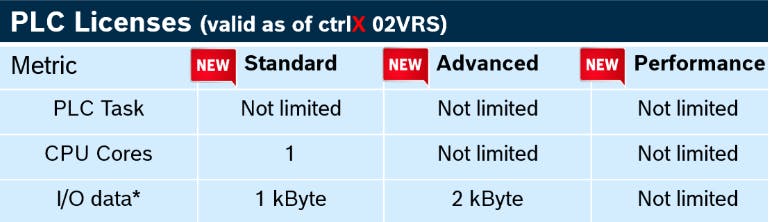
From version 3 on, there will be no limitation of PLC tasks anymore.
CPU Cores
The PLC program can run on one or multiple CPU cores. If you need to split your program on more than one CPU because of performance reasons, you need at least the "Advanced" license.
IO Data
The number of IO data is a result of the sum of all the data which is configured underneath the
‘DataLayer_Realtime’ Node or underneath the
Codesys field bus Add-Ons
Please note: By default only the variables are counted, which are actually used in the PLC program.
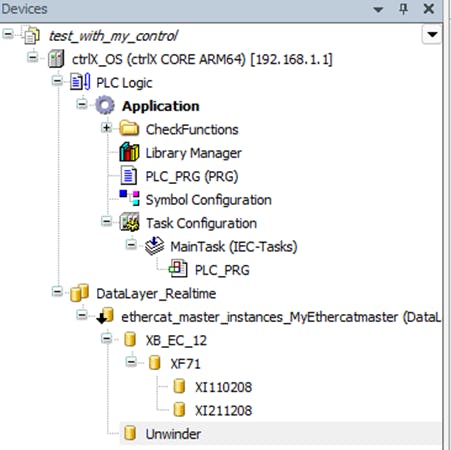
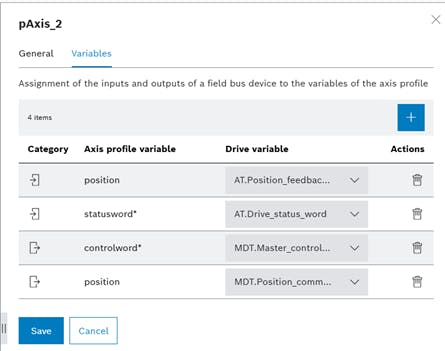
For using the motion functionality of an axis there is no need to add the axis under the "DataLayer_Realtime" node, because the ctrlX MOTION App and the Motion Interface directly communicate via the ctrlX Data Layer. This means that the parameters related to the ctrlX MOTION App don’t need to be added (e.g. Drive Status Word, Master Control Word, Position Command Value, Position Feedback Value, Probe Input Value, etc.)
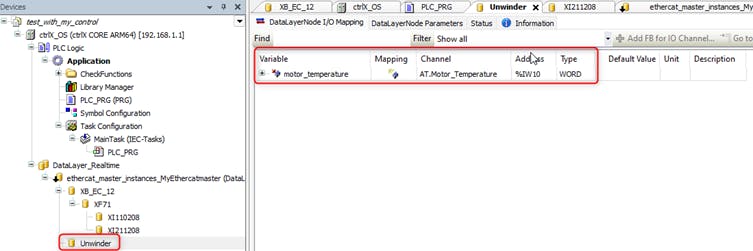
Only non-motion parameters, which should be processed in the PLC program in real time must be added. If you want to monitor for example a motor temperature in the PLC, then the drive parameter must be added.
In the first step you need to add it in the cyclic process data via the IO Engineering. Below you can see the configuration of one drive, where the default parameters were extended by the motor temperature.
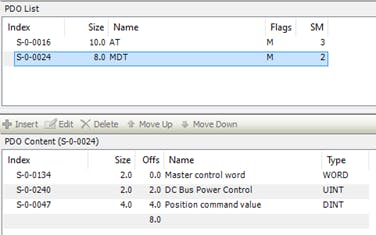
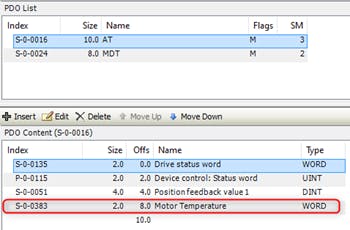
This configuration from the ctrlX IO Engineering can be imported in the ctrlX Motion App. All the variables related to the motion App will show up in the Axis profile and must not be configured underneath the "DataLayer_Realtime" node.
Only the motor temperature from the example above must be added underneath the "DataLayer_Realtime" node and hence will increases the amount of IO data.
FSoE telegrams don’t have to be considered. They are exchanged between FSoE Master and Slave directly and won’t be processed via the PLC. However, the PLC normally needs to read out at least status information, e.g.:
Status of safe inputs, like e-stops, safe door contacts, etc.
Status of the safe mode of the drives
etc
This information needs to be mapped into the PLC program and will in the end increase the amount of IO data.
Information of used IO data for IO module
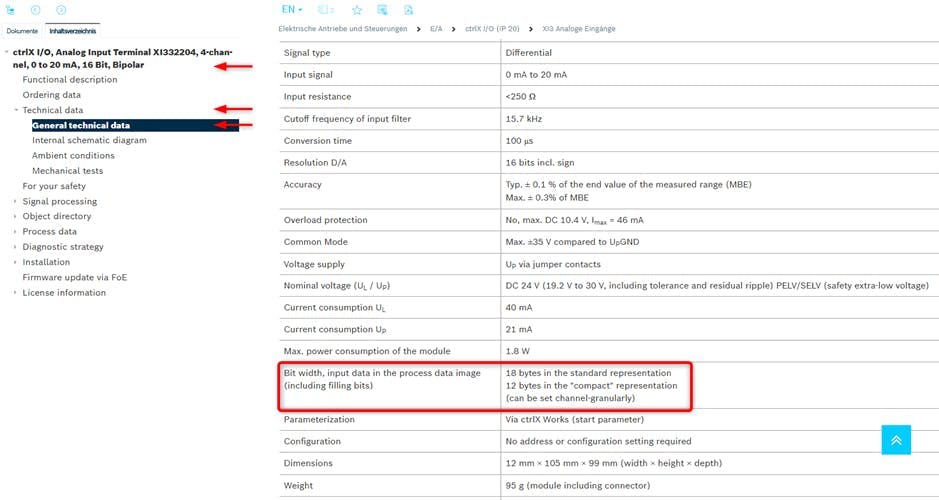
This following example shows, where you can find the bit width in the process data image for your IO module.
E.g.: ctrlX I/O, Analog Input Terminal XI332204, 4-channel, 0 to 20 mA, 16 Bit, Bipolar
General technical data - ctrlX AUTOMATION – Product information
Check the actual license status
The actual license status can be checked by clicking on the controller and select the tab <License Overview>.
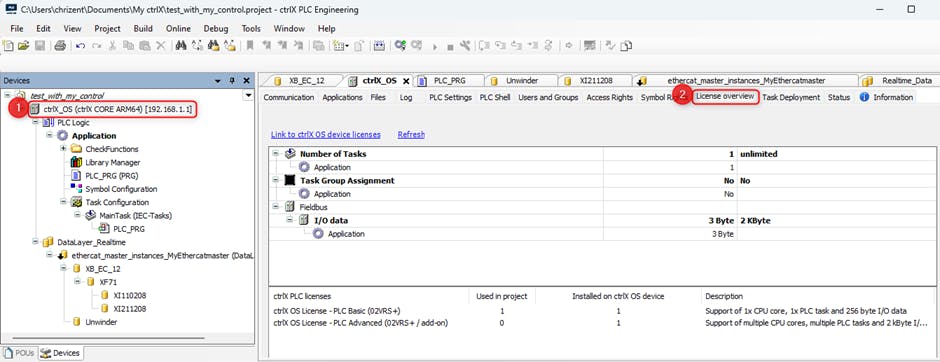
In the simple example from above the following configuration was used:
2 ctrlX DRIVES
a 2 Byte parameter was additionally configured on one of the drives
1 Bit digital input
1 Bit digital output
This adds up to 3 Byte IO data
Please note: the count is bit-wise, but rounded to a Byte value.
Example of a Robot Application
The application consists of:
2 x cartesian robots (6 axis in total)
1 belt axis
1 Safety PLC
1 bus coupler with 6 modules (details see screenshot below)
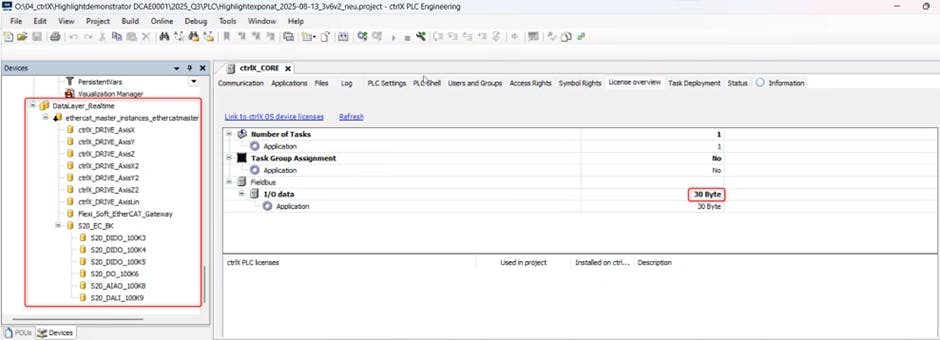
In total 30 Bytes are used in this example application, which are distributed like this:
5 Bytes of IO modules
0 Byte of Fieldbuses
24 Bytes Non-motion drive parameters (e.g. S-0-0135, S-0-0240, S-0-2057/2058)
1 Byte Communication with Safety PLC
Summary
Hence the amount of IO data consists mainly of:
The used IO modules
Fieldbus communication (Profinet, EthernetIP, ModbusTCP, etc.)
Additional non-motion related drive parameters, which are configured cyclically
Data exchange between the PLC and a safety PLC
Related links