I have a WebIQ app (2.16.3) with several views, and I'd like to set up dynamic navigation to different views: when a button is clicked, I want to trigger a custom UI action (written in JS) that will read the value of a virtual variable, decide which target page (i.e. view) to select based on that variable, and then initiate the navigation call from JS. I can't find the correct documentation that describes how to do this using the shmi framework, however. Can anyone point me in the right direction?
WebIQ navigation through Javascript
Best reply by HmiGuide
There are 3 different panel types in WebIQ, which works the same for setting and getting screen ID.
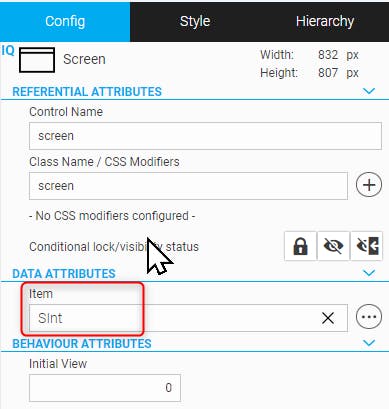
Enter an item into red marked field below
Use a virtual item, when you have multiple clients, otherwise the screen changes on all clients, when changing the screen on any client
Read value of SInt to get current screenID
Write value of SInt to set current screenID or use UI-Action setview
1
3 replies