WebIQ 2.16.3
Material design widgets
Widget "Recipe Edit"
Example project attached
When working with the widget, I noticed the following problems in the runtime of the widget:
Create a new recipe set, by pressing "Add" button, enter its name.
To enable the buttons Edit, Delete,... I must additionally select the new created item in widget "Recipe Controller"
=> The buttons must be activated automatically when the recipe is created.
if a recipe is edited and then saved, the recipe values are no longer displayed. To display the values again, I must additionally select the saved item in widget "Recipe Controller"
=> values must be visible, after saving a recipe
recipe content is difficult to read because it is grayed out. This is a problem on a real machine because users who do not have editing rights also have to read the recipe content.
tree view. Expanding sub-elements does NOT work for a single branch. Only for all branches.
=> Expand must work for single branch
tree view: The elements for all expanding/collapsing should always be accessible regardless of the scroll position, e.g. by positioning them in the header instead of in the scroll area.
Expanding/collapsing must be accessible when not in edit mode, otherwise user without edit rights cannot view all values.
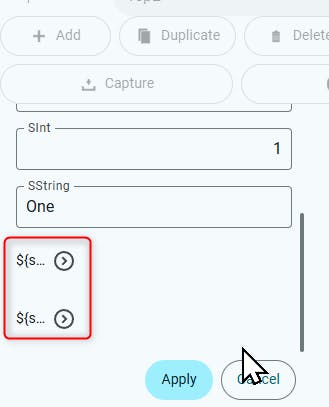
tree view: The name of the branch is cut off although there is still plenty of space.