DISCLAIMER! Use at your own risk.
There are several ways how you could use Modbus/RTU with ctrlX CORE. You can do it through I/O or RS485 to USB adapter. If you choose to use an adapter, the simplest option is Node-RED, which is already described in How-to. The guide below will show you an alternative way of building your own snap for Modbus/RTU communication through RS485 to USB adapter.
Prerequisite:
ctrlX CORE X3/X5/X7 (2.X.X / 3.X.X)
USB to RS485 converter (UT-890A used in this guide)
USB to USB-C adapter for connecting
Modbus/RTU Slave for testing, I use ctrlX I/O RS485/RS422 module (XI522001)
ctrlX AUTOMATION SDK
Build Environment (Local Ubuntu 22.04/Virtual Machine/App Build Environment)
Basic understanding of snapcraft
1. Overview
Snap structure is quite simple, it consists of
'main.py' - our main code, to run Modbus/RTU server and publish variables to the Datalayer
'setup.py' - script where we can add packages, scripts and folders to our snap
'snap/snapcraft.yaml' - file that describes how to pack our project inside a snap, here we describe how our snap communicates with the rest of the system, define stage and python packages and source files
1. Snapcraft.yaml
This project can be cross built on arm64/amd46 devices, so you don't need to get native arm64 device in case you are building for ctrlX CORE X3. File below includes required plugs, pymodbus and datalayer libraries as well as other dependencies:
name: modbus-rtu-master
title: Modbus RTU master
version: 0.0.7
summary: Modbus RTU
description: |
  Settings available through Datalayer
base: core22
confinement: strict
grade: stable

architectures:
  - build-on: [amd64]
    build-for: [arm64]

apps:
  client:
    command: bin/main.py
    plugs:
      - network
      - network-bind
      - datalayer
      - system-observe
      - serial-port
      - raw-usb
      - hardware-observe
    daemon: simple
    restart-condition: always
    passthrough:
      restart-delay: 30s
    environment:
        "LD_LIBRARY_PATH": "$LD_LIBRARY_PATH:$SNAP/usr/lib/python3.10/dist-packages"


parts:
  client:
    plugin: python
    source: .
    build-environment:
      - PYTHONPATH: "$SNAPCRAFT_PART_INSTALL/usr/lib/python3/dist-packages"
    override-build: |
      snapcraftctl build
      ln -sf ../usr/lib/libsnapcraft-preload.so $SNAPCRAFT_PART_INSTALL/lib/libsnapcraft-preload.so
    stage-packages:
      - libzmq5
      - libsystemd-dev
    python-packages:
      - pymodbus
      - ctrlx-datalayer
      - ctrlx-fbs
    build-packages:
      - build-essential


  datalayerdeb:
    plugin: dump
    source: https://github.com/boschrexroth/ctrlx-automation-sdk/releases/download/3.4.0/ctrlx-datalayer-2.8.6.deb
    source-type: deb


plugs:
  datalayer:
    interface: content
    content: datalayer
    target: $SNAP_DATA/.datalayer
2. Setup.py
We include our main script, helper module for datalayer execution, and optionally python packages (can do it either here or in snapcraft.yaml):
# SPDX-FileCopyrightText: Bosch Rexroth AG
#
# SPDX-License-Identifier: MIT
from setuptools import setup

setup(name = 'modbus-rtu-master',
      version='1.0.0',
      description = 'Test Modbus RTU communication',
      author = 'Akra',
      #install_requires = ['ctrlx-datalayer', 'ctrlx-fbs'],
      packages = ['helper'],
      scripts = ['main.py'],
      license = 'MIT License'
)
3. Datalayer helper
Script for creating datalayer Provider and Client 'helper/ctrlx_datalayer_helper.py':
# SPDX-FileCopyrightText: Bosch Rexroth AG
#
# SPDX-License-Identifier: MIT

import os

import ctrlxdatalayer

"""
This script provides auxiliary methods to create ctrlX Datalayer client and provider connections to ctrlX CORE devices.
It can be used for both running in an app build environment (QEMU VM) and within the snap environment on the ctrlX CORE.

Feel free to use it in your projects and to change it if necessary.

For ease of use, the default values for IP address, user, password and SSL port are chosen to match the settings of a
newly created ctrlX CORE:

    ip="192.168.1.1"
    user="boschrexroth"
    password="boschrexroth"
    ssl_port=443

If these values do not suit your use case, explicitly pass the parameters that require different values.
Here some examples:

1. ctrlX CORE or ctrlX COREvirtual with another IP address, user and password:

    client, client_connection = get_client(system, ip="192.168.1.100", user="admin", password="-$_U/{X$aG}Z3/e<")

2. ctrlX COREvirtual with port forwarding running on the same host as the app build environment (QEMU VM):

    client, client_connection = get_client(system, ip="10.0.2.2", ssl_port=8443)

    Remarks:
    10.0.2.2 is the IP address of the host from the point of view of the app build environment (QEMU VM).
    8443 is the host port which is forwarded to the SSL port (=433) of the ctrlX COREvirtual


IMPORTANT:
You need not change the parameter settings before building a snap and installing the snap on a ctrlX CORE.
The method get_connection_string detects the snap environment and uses automatically inter process communication.
Therefor the connection string to the ctrlX Datalayer is:

    "ipc://"

"""


def get_connection_string(
        ip="192.168.1.1",
        user="boschrexroth",
        password="boschrexroth",
        ssl_port=443):
    """
    Combines a ctrlX Datalayer connection string.
    @param[in] ip IP address of the ctrlX CORE. Use "10.0.2.2" to connect to a ctrlX COREvirtual with port forwarding.
    @param[in] user Name of the user.
    @param[in] password Password of the user.
    @param[in] ssl_port Port number for a SSL connection. ctrlX COREvirtual with port forwarding: Use the host port (default 8443) forwarded to port 22 of the ctrlX COREvirtual.
    @returns connection_string The connection string: "ipc://" for running in snap environment, "tcp://..." for running in environment.
    """

    if 'SNAP' in os.environ:
        return "ipc://"

    # Client connection port 2069 resp. Provider connection port 2070 are obsolete
    connection_string = "tcp://"+user+":"+password+"@"+ip

    if ssl_port == 443:
        return connection_string

    return connection_string+"?sslport=" + str(ssl_port)


def get_client(system: ctrlxdatalayer.system.System,
               ip="192.168.1.1",
               user="boschrexroth",
               password="boschrexroth",
               ssl_port=443):
    """
    Creates a ctrlX Datalayer client instance.
    @param[in] system A ctrlxdatalayer.system.System instance
    @param[in] ip IP address of the ctrlX CORE. Use "10.0.2.2" to connect to a ctrlX COREvirtual with port forwarding.
    @param[in] user Name of the user.
    @param[in] password Password of the user.
    @param[in] ssl_port Port number for a SSL connection. ctrlX COREvirtual with port forwarding: Use the host port (default 8443) forwarded to port 22 of the ctrlX COREvirtual.
    @returns tuple  (client, connection_string)
    @return <client> The ctrlxdatalayer.client.Client instance or None if failed
    @return <connection_string> The connection string or None if failed
    """

    connection_string = get_connection_string(
        ip, user, password, ssl_port)
    client = system.factory().create_client(connection_string)
    if client.is_connected():
        return client, connection_string
    client.close()

    return None, connection_string


def get_provider(system: ctrlxdatalayer.system.System,
                 ip="192.168.1.1",
                 user="boschrexroth",
                 password="boschrexroth",
                 ssl_port=443):
    """
    Creates a ctrlX Datalayer provider instance.
    @param[in] system A ctrlxdatalayer.system.System instance
    @param[in] ip IP address of the ctrlX CORE. Use "10.0.2.2" to connect to a ctrlX COREvirtual with port forwarding.
    @param[in] user Name of the user.
    @param[in] password Password of the user.
    @param[in] ssl_port Port number for a SSL connection. ctrlX COREvirtual with port forwarding: Use the host port (default 8443) forwarded to port 22 of the ctrlX COREvirtual.
    @returns tuple  (provider, connection_string)
    @return <provider>, a ctrlxdatalayer.provider.Provider instance or None if failed,
    @return <connection_string>, a connection string or None if failed
    """
    connection_string = get_connection_string(
        ip, user, password, ssl_port)
    provider = system.factory().create_provider(connection_string)
    if (provider.start() == ctrlxdatalayer.variant.Result.OK) & provider.is_connected():
        return provider, connection_string
    provider.close()

    return None, connection_string
4. Main code
Let's implement 'main.py'!
4.1. Imports and variable declaration
We include all the required imports and create variables to store settings for our Modbus/RTU Master
#!/usr/bin/env python3

# SPDX-FileCopyrightText: Bosch Rexroth AG
#
# SPDX-License-Identifier: MIT

import signal
import sys
import threading
from time import sleep
import logging

import pymodbus
from pymodbus.client import ModbusSerialClient as ModbusClient
from pymodbus.framer import FramerType

from helper.ctrlx_datalayer_helper import get_client, get_provider

import ctrlxdatalayer
import flatbuffers

from comm.datalayer import DisplayFormat, Metadata, NodeClass
from ctrlxdatalayer.provider import Provider
from ctrlxdatalayer.provider_node import (
    ProviderNode,
    ProviderNodeCallbacks,
    NodeCallback,
)
from ctrlxdatalayer.variant import Result, Variant, VariantType
from ctrlxdatalayer.metadata_utils import (
    MetadataBuilder,
    AllowedOperation,
    ReferenceType,
)

logger = logging.getLogger(__name__)
logging.basicConfig(level=logging.INFO, format='%(asctime)s %(message)s')

__close_app = False

# Modbus connection settings (will be read from datalayer)
modbus_port = "/dev/ttyUSB0"
modbus_baudrate = 9600
modbus_parity = "N"
modbus_timeout = 0.1
modbus_start_address = 248
modbus_count = 4
modbus_slave_id = 1
modbus_read_enable = False

# Modbus data storage
modbus_registers = []

# Base address for datalayer nodes
address_base = "modbus_rtu/settings/"
We will read settings for:
port (our ttyUSB0 address)
baudrate
parity
timeout
register start address
registers count
slave id
And write output registers, optionally you can add coils, if needed.
4.2. Datalayer provider class
This is a wrapper for Datalayer provider nodes, it implements callbacks for read, write, metadata, create, remove and browse operations:
class MyProviderNode:
    """MyProviderNode"""

    def __init__(self, provider: Provider, address: str, initialValue: Variant):
        """__init__"""
        self._cbs = ProviderNodeCallbacks(
            self.__on_create,
            self.__on_remove,
            self.__on_browse,
            self.__on_read,
            self.__on_write,
            self.__on_metadata,
        )

        self._providerNode = ProviderNode(self._cbs)

        self._provider = provider
        self._address = address
        self._data = initialValue
        self._metadata = MyProviderNode.__get_metadata(address)

    @staticmethod
    def __get_metadata(address: str) -> Variant:
        builder = MetadataBuilder(
            allowed=AllowedOperation.READ | AllowedOperation.WRITE
        )
        builder = builder.set_display_name(address)
        builder = builder.set_node_class(NodeClass.NodeClass.Variable)
        if address.rfind("string") != -1:
            builder.add_reference(ReferenceType.read(), "types/datalayer/string")
            builder.add_reference(ReferenceType.write(), "types/datalayer/string")
        return builder.build()

    def register_node(self):
        """register_node"""
        return self._provider.register_node(self._address, self._providerNode)

    def unregister_node(self):
        """unregister_node"""
        self._provider.unregister_node(self._address)
        self._metadata.close()
        self._data.close()

    def set_value(self, value: Variant):
        """set_value"""
        self._data = value

    def __on_create(
        self,
        userdata: ctrlxdatalayer.clib.userData_c_void_p,
        address: str,
        data: Variant,
        cb: NodeCallback,
    ):
        """__on_create"""
        print("__on_create()", "address:", address, "userdata:", userdata, flush=True)
        cb(Result.OK, data)

    def __on_remove(
        self,
        userdata: ctrlxdatalayer.clib.userData_c_void_p,
        address: str,
        cb: NodeCallback,
    ):
        """__on_remove"""
        print("__on_remove()", "address:", address, "userdata:", userdata, flush=True)
        cb(Result.UNSUPPORTED, None)

    def __on_browse(
        self,
        userdata: ctrlxdatalayer.clib.userData_c_void_p,
        address: str,
        cb: NodeCallback,
    ):
        """__on_browse"""
        print("__on_browse()", "address:", address, "userdata:", userdata, flush=True)
        with Variant() as new_data:
            new_data.set_array_string([])
            cb(Result.OK, new_data)

    def __on_read(
        self,
        userdata: ctrlxdatalayer.clib.userData_c_void_p,
        address: str,
        data: Variant,
        cb: NodeCallback,
    ):
        """__on_read"""
        new_data = self._data
        cb(Result.OK, new_data)

    def __on_write(
        self,
        userdata: ctrlxdatalayer.clib.userData_c_void_p,
        address: str,
        data: Variant,
        cb: NodeCallback,
    ):
        """__on_write"""
        if self._data.get_type() != data.get_type():
            cb(Result.TYPE_MISMATCH, None)
            return

        result, self._data = data.clone()
        cb(Result.OK, self._data)

    def __on_metadata(
        self,
        userdata: ctrlxdatalayer.clib.userData_c_void_p,
        address: str,
        cb: NodeCallback,
    ):
        """__on_metadata"""
        cb(Result.OK, self._metadata)
4.3. Datalayer Provider functions
We set base address of the node in Datalayer and create functions for publishing:
def provide_string(provider: ctrlxdatalayer.provider, name: str, initial_value: str):
    """provide_string"""
    print("Creating string provider node " + address_base + name, flush=True)
    variantString = Variant()
    variantString.set_string(initial_value)
    provider_node_str = MyProviderNode(provider, address_base + name, variantString)
    result = provider_node_str.register_node()
    if result != ctrlxdatalayer.variant.Result.OK:
        print(
            "ERROR Registering node " + address_base + name + " failed with:",
            result,
            flush=True,
        )
    return provider_node_str


def provide_int(provider: ctrlxdatalayer.provider, name: str, initial_value: int):
    """provide_int"""
    print("Creating int provider node " + address_base + name, flush=True)
    variantInt = Variant()
    variantInt.set_int32(initial_value)
    provider_node_int = MyProviderNode(provider, address_base + name, variantInt)
    result = provider_node_int.register_node()
    if result != ctrlxdatalayer.variant.Result.OK:
        print(
            "ERROR Registering node " + address_base + name + " failed with:",
            result,
            flush=True,
        )
    return provider_node_int


def provide_float(provider: ctrlxdatalayer.provider, name: str, initial_value: float):
    """provide_float"""
    print("Creating float provider node " + address_base + name, flush=True)
    variantFloat = Variant()
    variantFloat.set_float32(initial_value)
    provider_node_flt = MyProviderNode(provider, address_base + name, variantFloat)
    result = provider_node_flt.register_node()
    if result != ctrlxdatalayer.variant.Result.OK:
        print(
            "ERROR Registering node " + address_base + name + " failed with:",
            result,
            flush=True,
        )
    return provider_node_flt


def provide_bool(provider: ctrlxdatalayer.provider, name: str, initial_value: bool):
    """provide_bool"""
    print("Creating bool provider node " + address_base + name, flush=True)
    variantBool = Variant()
    variantBool.set_bool8(initial_value)
    provider_node_bl = MyProviderNode(provider, address_base + name, variantBool)
    result = provider_node_bl.register_node()
    if result != ctrlxdatalayer.variant.Result.OK:
        print(
            "ERROR Registering node " + address_base + name + " failed with:",
            result,
            flush=True,
        )
    return provider_node_bl


def provide_int_array(provider: ctrlxdatalayer.provider, name: str):
    """provide_int_array"""
    print("Creating int array provider node " + address_base + name, flush=True)
    variantIntArray = Variant()
    variantIntArray.set_array_int32([])
    provider_node_arr = MyProviderNode(provider, address_base + name, variantIntArray)
    result = provider_node_arr.register_node()
    if result != ctrlxdatalayer.variant.Result.OK:
        print(
            "ERROR Registering node " + address_base + name + " failed with:",
            result,
            flush=True,
        )
    return provider_node_arr
4.4. Datalayer Provider thread
It will start create datalayer provider, register output nodes and run until shutdown, then delete the created nodes:
def handler(signum, frame):
    """handler"""
    global __close_app
    __close_app = True

def dl_provider():
    """Datalayer Provider Thread"""
    with ctrlxdatalayer.system.System("") as datalayer_system:
        datalayer_system.start(False)

        provider, connection_string = get_provider(
            datalayer_system, ip="192.168.1.1", user="boschrexroth", password="boschrexroth"
        )
        if provider is None:
            print("ERROR Connecting", connection_string, "failed.", flush=True)
            sys.exit(1)

        with provider:
            result = provider.start()
            if result != Result.OK:
                print(
                    "ERROR Starting ctrlX Data Layer Provider failed with:",
                    result,
                    flush=True,
                )
                return

            # Create provider nodes for Modbus settings
            provide_node_port = provide_string(provider, "port", modbus_port)
            provide_node_baudrate = provide_int(provider, "baudrate", modbus_baudrate)
            provide_node_parity = provide_string(provider, "parity", modbus_parity)
            provide_node_timeout = provide_float(provider, "timeout", modbus_timeout)
            provide_node_start_address = provide_int(provider, "start_address", modbus_start_address)
            provide_node_count = provide_int(provider, "count", modbus_count)
            provide_node_slave_id = provide_int(provider, "slave_id", modbus_slave_id)
            provide_node_read_enable = provide_bool(provider, "read_enable", modbus_read_enable)

            # Output node for holding registers
            provide_node_registers = provide_int_array(provider, "registers")

            print("INFO Running provider loop...", flush=True)
            while provider.is_connected() and not __close_app:
                sleep(1.0)

            print("ERROR ctrlX Data Layer Provider is disconnected", flush=True)

            # Cleanup
            provide_node_port.unregister_node()
            del provide_node_port
            provide_node_baudrate.unregister_node()
            del provide_node_baudrate
            provide_node_parity.unregister_node()
            del provide_node_parity
            provide_node_timeout.unregister_node()
            del provide_node_timeout
            provide_node_start_address.unregister_node()
            del provide_node_start_address
            provide_node_count.unregister_node()
            del provide_node_count
            provide_node_slave_id.unregister_node()
            del provide_node_slave_id
            provide_node_read_enable.unregister_node()
            del provide_node_read_enable
            provide_node_registers.unregister_node()
            del provide_node_registers

            print("Stopping ctrlX Data Layer provider:", end=" ", flush=True)
            result = provider.stop()
            print(result, flush=True)

        stop_ok = datalayer_system.stop(False)
        print("System Stop", stop_ok, flush=True)
4.5. Datalayer Client thread
We cyclically read and write data to the variables created by Provider.
def dl_client():
    """Datalayer Client Thread"""
    global modbus_port, modbus_baudrate, modbus_parity, modbus_timeout
    global modbus_start_address, modbus_count, modbus_slave_id
    global modbus_read_enable, modbus_registers

    with ctrlxdatalayer.system.System("") as datalayer_system:
        datalayer_system.start(False)

        datalayer_client, datalayer_client_connection_string = get_client(
            datalayer_system, ip="192.168.1.1", user="boschrexroth", password="boschrexroth"
        )
        if datalayer_client is None:
            print(
                f"ERROR Connecting {datalayer_client_connection_string} failed.",
                flush=True
            )
            sys.exit(1)

        with datalayer_client:
            if datalayer_client.is_connected() is False:
                print(f"ERROR ctrlX Data Layer is NOT connected: {datalayer_client_connection_string}",
                    flush=True
                )
                sys.exit(1)

            while datalayer_client.is_connected() and not __close_app:
                # Read Modbus settings from datalayer
                addr = address_base + "port"
                result, string_var = datalayer_client.read_sync(addr)
                if result == Result.OK:
                    modbus_port = string_var.get_string()

                addr = address_base + "baudrate"
                result, int_var = datalayer_client.read_sync(addr)
                if result == Result.OK:
                    modbus_baudrate = int_var.get_int32()

                addr = address_base + "parity"
                result, string_var = datalayer_client.read_sync(addr)
                if result == Result.OK:
                    modbus_parity = string_var.get_string()

                addr = address_base + "timeout"
                result, float_var = datalayer_client.read_sync(addr)
                if result == Result.OK:
                    modbus_timeout = float_var.get_float32()

                addr = address_base + "start_address"
                result, int_var = datalayer_client.read_sync(addr)
                if result == Result.OK:
                    modbus_start_address = int_var.get_int32()

                addr = address_base + "count"
                result, int_var = datalayer_client.read_sync(addr)
                if result == Result.OK:
                    modbus_count = int_var.get_int32()

                addr = address_base + "slave_id"
                result, int_var = datalayer_client.read_sync(addr)
                if result == Result.OK:
                    modbus_slave_id = int_var.get_int32()

                addr = address_base + "read_enable"
                result, bool_var = datalayer_client.read_sync(addr)
                if result == Result.OK:
                    modbus_read_enable = bool_var.get_bool8()

                # Write registers data back to datalayer
                with Variant() as data:
                    data.set_array_int32(modbus_registers)
                    addr = address_base + "registers"
                    result = datalayer_client.write_sync(addr, data)

                sleep(0.5)

            print("ERROR ctrlX Data Layer Client is NOT connected")

        stop_ok = datalayer_system.stop(False)
        print("System Stop", stop_ok, flush=True)
4.6. Modbus/RTU Master
Now it's time to add the Modbus/RTU Master itself, we read the settings and wait for trigger signal from Datalayer to start our Master, I also add delay to refresh register data every second:
def modbus_master():
    """Modbus Reading"""
    global modbus_port, modbus_baudrate, modbus_parity, modbus_timeout
    global modbus_start_address, modbus_count, modbus_slave_id
    global modbus_read_enable, modbus_registers

    client = None
    last_config = None

    while not __close_app:
        # New settings
        current_config = (modbus_port, modbus_baudrate, modbus_parity, modbus_timeout)

        if modbus_read_enable:
            # Reconnect if configuration changed
            if current_config != last_config:
                if client is not None:
                    try:
                        client.close()
                    except:
                        pass

                logger.info(f"Connecting to Modbus RTU: port={modbus_port}, baudrate={modbus_baudrate}, parity={modbus_parity}, timeout={modbus_timeout}")

                try:
                    client = ModbusClient(
                        port=modbus_port,
                        baudrate=modbus_baudrate,
                        parity=modbus_parity,
                        timeout=modbus_timeout
                    )
                    connection = client.connect()
                    if connection:
                        logger.info("Modbus RTU connected successfully")
                        last_config = current_config
                    else:
                        logger.error("Failed to connect to Modbus RTU")
                        client = None
                        sleep(2.0)
                        continue
                except Exception as e:
                    logger.error(f"Error connecting to Modbus RTU: {e}")
                    client = None
                    sleep(2.0)
                    continue

            # Read holding registers
            if client is not None:
                try:
                    read_vals = client.read_holding_registers(
                        modbus_start_address,
                        count=modbus_count,
                        device_id=modbus_slave_id
                    )

                    if read_vals is not None and not read_vals.isError():
                        modbus_registers = list(read_vals.registers)
                        logger.info(f"Read registers: {modbus_registers}")
                    else:
                        logger.error(f"Error reading registers: {read_vals}")
                        modbus_registers = []

                except Exception as e:
                    logger.error(f"Exception reading Modbus registers: {e}")
                    modbus_registers = []

            sleep(1.0)  # Delay
        else:
            # Disconnect when read is disabled
            if client is not None:
                try:
                    client.close()
                except:
                    pass
                client = None
                last_config = None
                logger.info("Modbus reading disabled, disconnected")

            sleep(0.5)
4.6. Threading
Now we just add threading to start all parts of our code simultaneously:
if __name__ == "__main__":
    signal.signal(signal.SIGINT, handler)
    signal.signal(signal.SIGTERM, handler)
    signal.signal(signal.SIGABRT, handler)

    try:
        logger.info('Starting Modbus RTU Snap with Datalayer Integration')

        # Start provider thread
        logger.info('Starting Data Layer Provider thread')
        t_provider = threading.Thread(target=dl_provider)
        t_provider.start()

        sleep(3.0)  # Wait for provider to initialize

        # Start client thread
        logger.info('Starting Data Layer Client thread')
        t_client = threading.Thread(target=dl_client)
        t_client.start()

        # Start Modbus master thread
        logger.info('Starting Modbus Master thread')
        t_modbus = threading.Thread(target=modbus_master)
        t_modbus.start()

        t_provider.join()
        t_client.join()
        t_modbus.join()

    except Exception as e:
        logger.error("Error: " + str(e))
5. Build the snap
Assuming your build environment is already set, just run build command, make sure your build-on and build-for sections in 'snapcraft.yaml' are set correctly:
snapcraft --destructive-mode6. Install the snap
Now, install the snap on your device:

7. Connect and Wire
I use ctrlX I/O module instead of a real slave in this example. For the real-world application, it's required to wire slave device directly to Modbus adapter. You can skip this step in case you have an actual slave device.
Connect the Converter to USB port of ctrlX CORE and wire it to the slave device accordingly. In this case I wire ctrlX CORE RS485 I/O module, Tx+/Tx-/Ground to Tx+/Tx-/Ground of adapter.
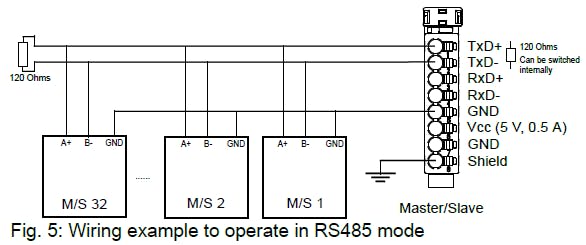
If you will do it with ctrlX I/O in Slave mode, the essential steps would be to configure the module in ctrlX I/O Engineering, adding required configurations (RS485 mode, baudrate, parity) and creating a simple PLC code.
Scan bus for I/O modules
Add settings
Download it to the Device
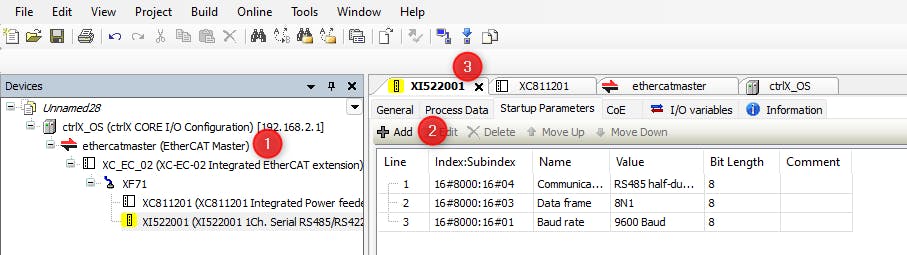
Simple example to use I/O as a slave can be found in library examples:
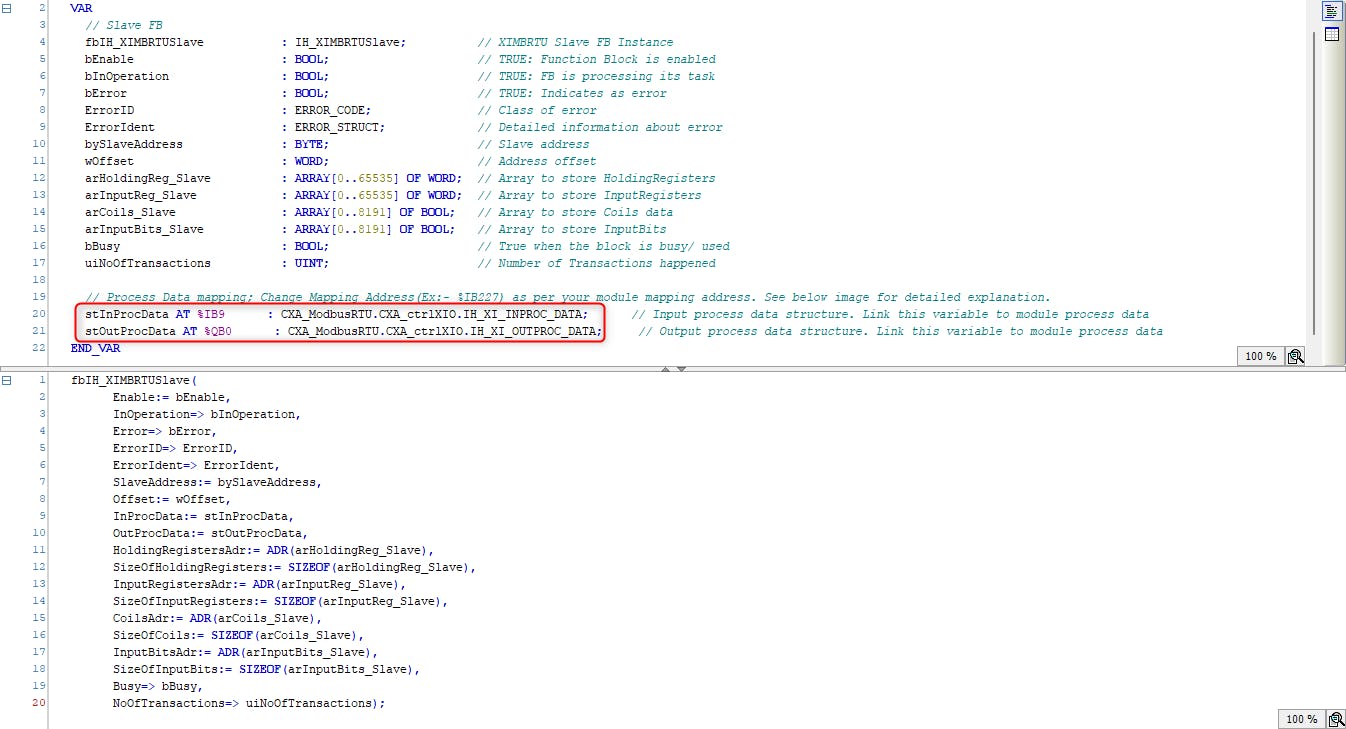
You will need to change input and output addresses depending on your actual I/O:
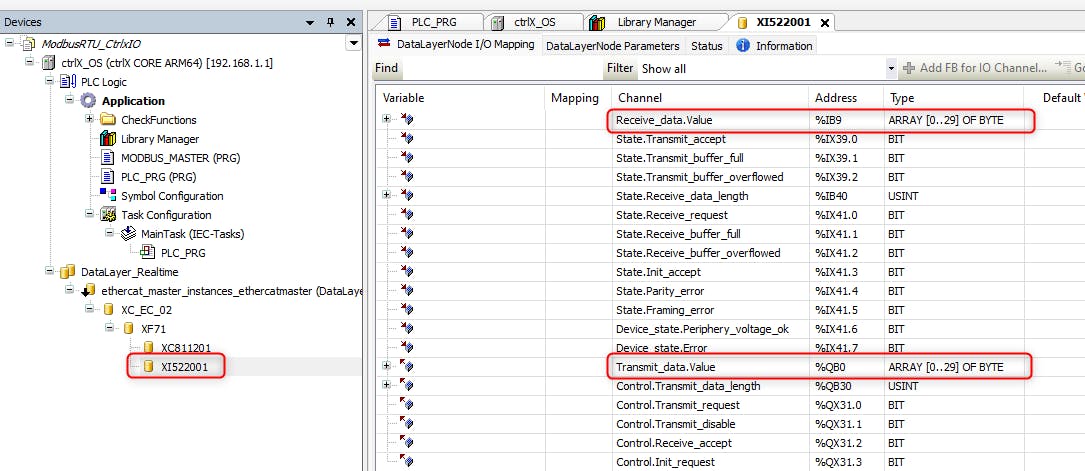
8. Control the app through Datalayer
Now you can communicate I/O with the snap and send register data from PLC to snap:
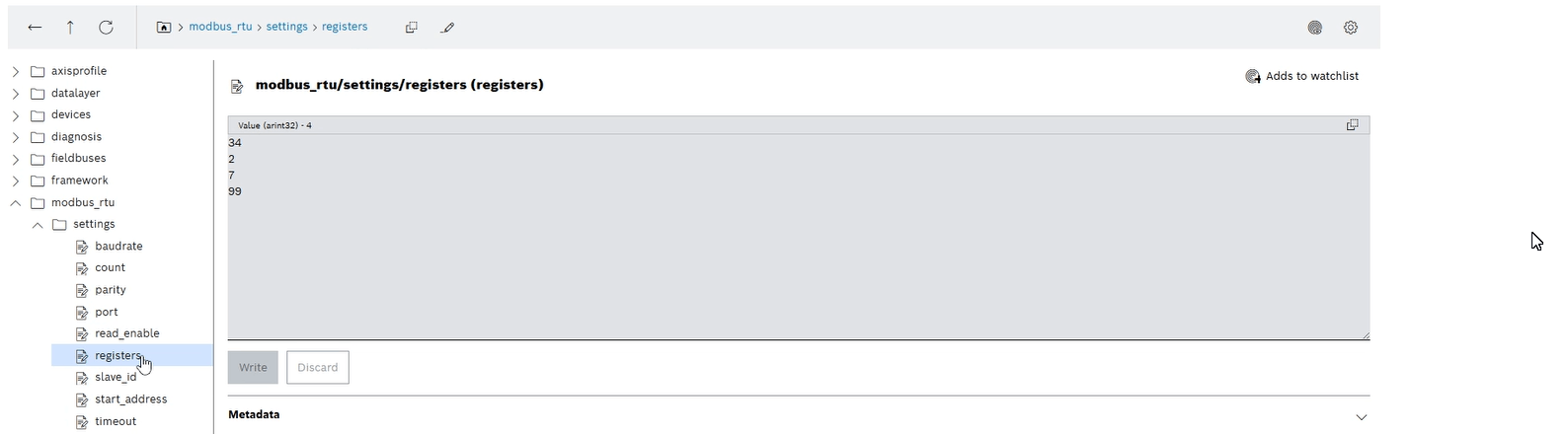
See the full video of the running process:
Have fun with it!
Related Links:
GitHub - boschrexroth/ctrlx-automation-sdk: ctrlX AUTOMATION Software Development Kit
