Intention of this paper
ctrlX DRIVE with EX-option (EX-option is integrated in drive)
ctrlX CORE with EX-option (EX-option is a standalone device, not available yet)
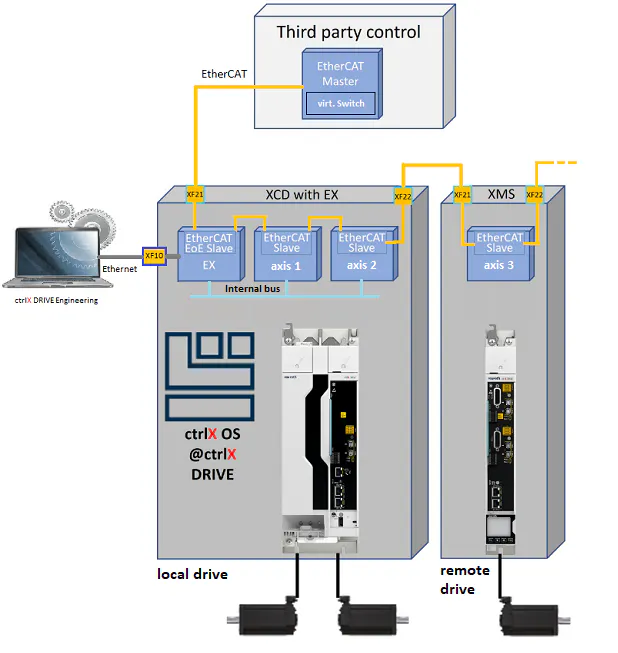
This document describes the technical requirements of an 3rd - party EtherCAT master, allowing the EX option to communicate with every drive on the EtherCAT network. Based on this, ctrlX OS Apps on the EX-Option or ctrlX DRIVE Engineering, connected to the EX-Option via Ethernet (Ethernet Port XF10), can access data (parameters) in local and remote drives
ℹ️ For detailed user documentation of ctrlX DRIVE Extended Engineering based
on ctrlX OS pls. refer to ctrlX DRIVE Option "EX", ctrlX OS Extended Engineering, Anwendungsbeschreibung
Basic principle of EX operation in an EtherCAT network
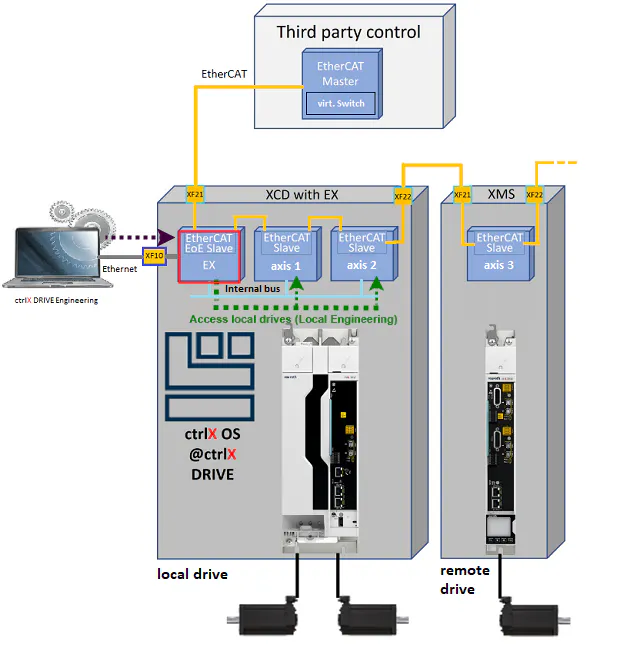
Accessing local axes
Access to the local axes is not based on EtherCAT communication and therefore works independently. Accessing the local axes from the EX-Option is always possible (so called Local Engineering).
Accessing remote axes on the EtherCAT network
The communication between EX option and the remote EtherCAT slaves is based on the EoE mailbox protocol, meaning EoE messages have to be exchanged between EX option and the drive slave. Since the EtherCAT communication is based on a master-slave principle, no messages can be directly exchanged between EtherCAT slaves.
Therefore, two main use cases have to be distinguished:
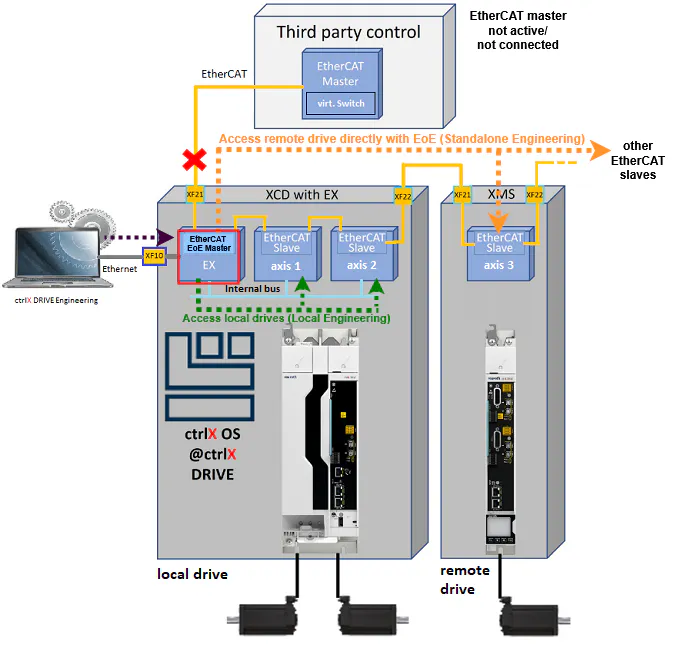
Standalone Engineering allows commissioning of all drive slaves on the EtherCAT network, when no active or no connected third - party EtherCAT master is available:
The EX-option becomes the EtherCAT (EoE) Master and exchanges directly EoE messages with every remote drive slave on the EtherCAT network.
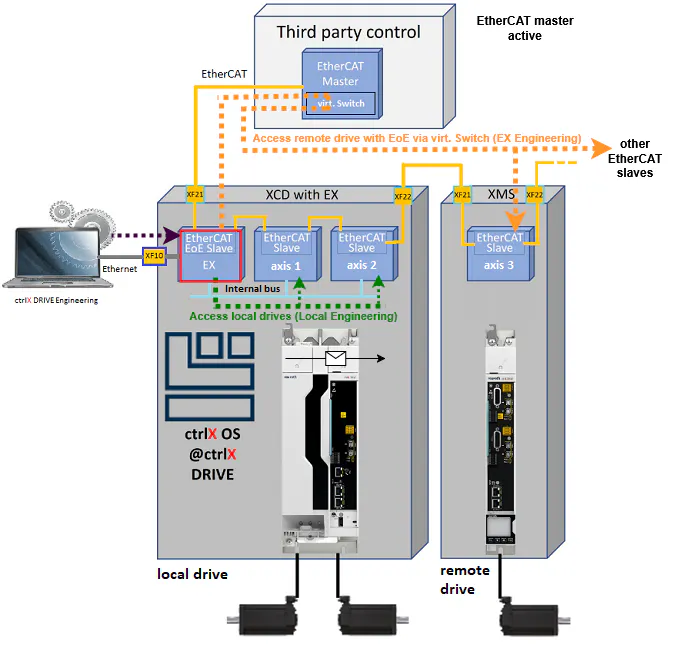
EX Engineering allows stady engineering access to all drive slaves in the EtherCAT network during commissioning and operation, when a connected third party EtherCAT master is active:
EtherCAT (EoE) master in the EX-Option becomes deactivated and the EX-option acts purely as an EtherCAT (EoE) slave. In this case the EoE messages between EX-option and drive slaves are sent to the EtherCAT master, which forwards them them to the appropriate remote slave.
ℹ️ To access remote drives from the EX option in an EtherCAT network, the third - party EtherCAT master in the network must support the Ethernet over EtherCAT (EoE) protocol including a message forwarding mechanism. For more information, see below (Requirements for 3rd - Party EtherCAT Master).⚠️ This is a mandatory requirement for engineering communication to remote EtherCAT slaves in the EX environment!
Requirements for 3rd Party EtherCAT Master Stacks
Required functionality in a 3rd party EtherCAT (ECAT) master to provide EoE communication from EX-Option to drive ECAT slaves (EX Engineering)
For using the EX option while EtherCAT Master is active or connected (→so called "EX Engineering"), EtherCAT Master must support "EoE protocol" and "virtual switch" (see unclassified master description below)!
Different EtherCAT master categories can be distinguished:
Class A master: standard extent with all functions of ETG specification ETG.1000 and additional functions of ETG.1020
Class A master implements EoE Protocol and virtual switch and therefore EX Engineering is enabled by default
⚠️ Make sure EoE/virtual switch is enabled in the master configuration if configurable
class B master: minimum extent, if class A implementation (e. g. due to missing resources) not possible. Only the main functions to run most EtherCAT devices are supported. Special feature packs are possible. EoE support is optional:
With EoE support (wich includes the virtual switch):
EX Engineering is enabled.
⚠️ Make sue EoE/virtual switch is enabled in the master configuration if configurable
Without EoE support:
EX Engineering is not enabled.
⚠️ In order to enable EX Engineering, the EoE protocol and the virtual switch has to be implemented by the control vendor (see unclassified master below)
Unclassified master: which neither complies with class A nor class B
For EX Engineering the flowing EoE features have to be implemented according ETG.1500 EtherCAT Master Classes
EoE Protocol
Description: Ethernet over EtherCAT (EoE) protocol is used to tunnel standard Ethernet frames through the EtherCAT networkReference: ETG.1000.5, ETG.1000.6, ETG.1020
Feature ID: 601
Virtual Switch
Description: The software-integrated Ethernet switch functionality is responsible for the routing of individual Ethernet frames to and from devices and the IP stack of the host operating system. The switch functionality is identical that of a standard Layer 2 Ethernet switch and responds to the Ethernet addresses used irrespective of the protocol.Reference: ETG.1000.5
Feature ID: 602
Impact of missing EoE support in 3rd - party control systems on use cases and possible workarounds
AFFECTED USE-CASES:
Commissioning:
Step 1: drive package commissing w/o 3rd - party control: → Operation in standalone engineering possible ✅
(→ Drive parametrization, Easy startup, oscilloscope useage, diagnostics, firmware management, serial commissioning, ... possible
Step 2: Validate and optimize Drive behavior with Motion Control operation, possible only for local axis (→"Local Engineering")⚠️
Service
Firmware management, device replacement, parametrization update, ... → Operation in standalone engineering is possible ✅
Operation
Drive diagnostics and monitoring during operation motion control operation, possible only for local axis (→"Local Engineering") ⚠️
List of 3rd party - controls with EtherCAT Master implementations and their EoE support
Example of EoE configuration in CoDeSys
[table align="left" vertical-align="top" header-color="grey02" column-color="" text-color="black"]
Control
Full EX support*
Classi-fication
EoE protocol
Virtual switch
Comments
Acontis Master stacks
yes
Class A, Class B
X
X
Acontis provides a class A and a class B master stack. In both cases EoE protocol and virtual switch is supported by the stack.
Depending on the control vendor, EoE is made available to the user:
Full EoE support (e.g. Bosch-Rexroth)
EoE can be activated with small effort (e.g. Hurco)
No EoE support (e.g. Omron)
TwinCAT von Beckhoff
yes
Class A
X
X
EoE implemented, it may need to be activated
Codesys
yes
Class A
X
X
*Especially EX Engineering, which allows accessing remote devices from EX-option
Example Setup and configuration of 3rd party control for EX Engineering use
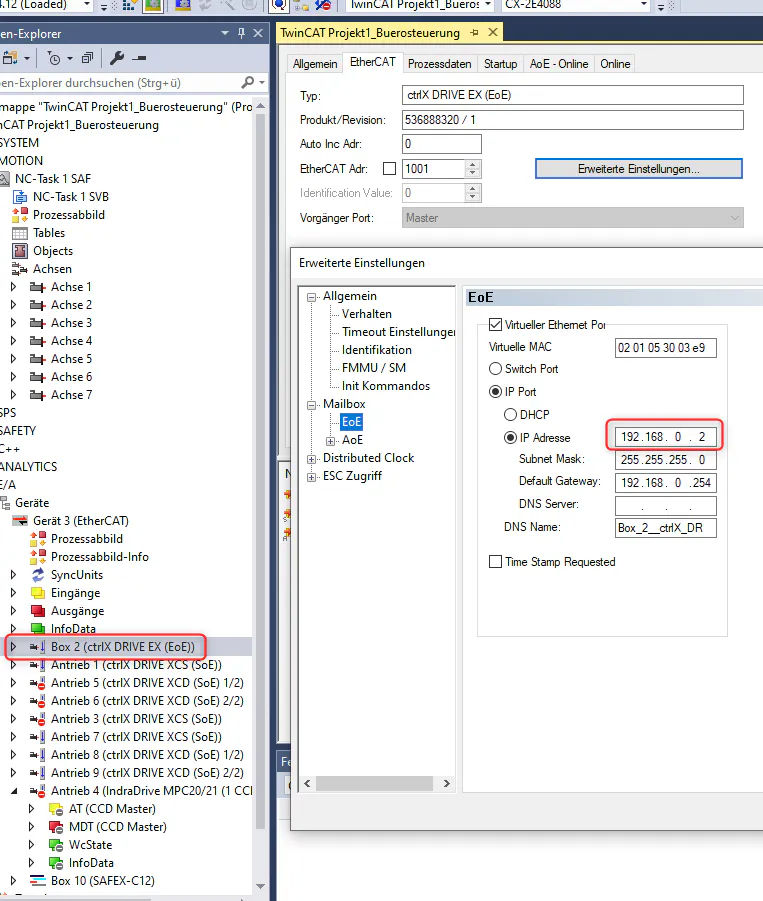
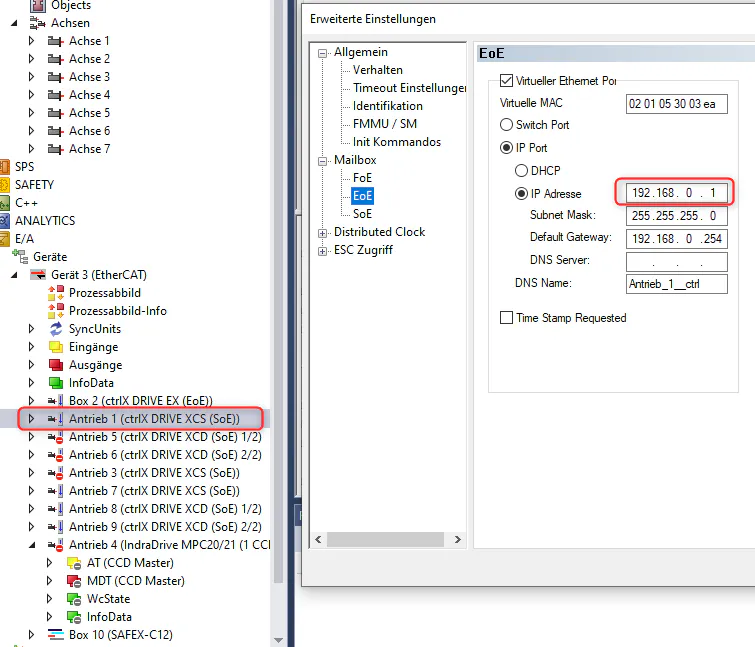
Example of EoE configuration in Beckhoff TwinCAT3.
Each EtherCAT-subdevice/slave (including the EX-option itself!) needs its own IP-address within the same network. EoE virtual Ethernet port has to be activated for each EtherCAT-Subdevice:
Example of EoE configuration in CoDeSys