IntroductionWhy or when to activate Additional FSoE Device Diagnostic?Activating Additional FSoE Device DiagnosticExample AlarmsExample 1Example 2FSoE Diagnostics A76xx Alarm OverviewAdditional Resources
Introduction
In this how-to we show how to activate additional FSoE Diagnostics during startup to help troubleshoot FSoE device connection issues.
[callout type="warning" text="NOTE: This is a diagnostic function for FSoE commissioning purposes. After startup (commissioning) when FSoE devices are communicating correctly this function needs to be switched off again (default setting) to help prevent race condition problems between different FSoE devices during bootup."]
Why or when to activate Additional FSoE Device Diagnostic?
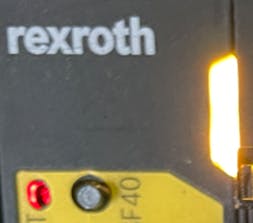
During initial commissioning if the FSoE device (i.e. ctrlX DRIVEplus) and SAFEX-C.1x safety control are not properly configured FSoE communications may not be established. This is indicated with the status “RunIntern” and a solid yellow PF01 LED on the SAFEX-C.1x safety control:
The “RunIntern” status can be seen in the status line of ctrlX SAFETY Engineering:

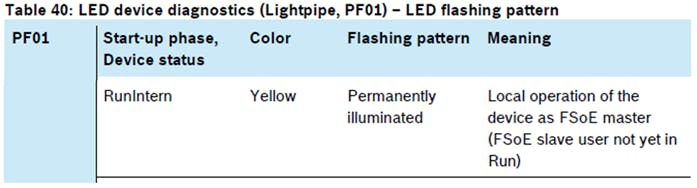
In this state, FSoE has been configured but the FSoE device is not yet in Run. No alarms are generated for the FSoE device. The safety program is in RUN and digital IO are working without the FSoE device. Here is a description from the documentation:
Most times this is due to difference in configuration between the device (i.e. ctrlX DRIVEplus) and SAFEX-C.1x settings\parameters. In these cases, activating or switching on Additional FSoE Device Diagnostics the FSoE Master "main device SAFEX-C.1x" can bring an alarm message (A76xx) to help determine the root cause, examples are:
wrong parameter length
wrong safety address
wrong profile
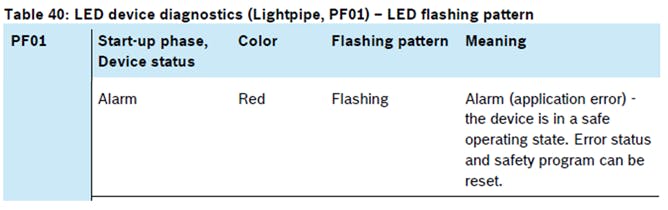
During an alarm state (i.e. A76xx) the SAFEX-C.1x is switched to a safe state and turns OFF the digital IOs:
Activating Additional FSoE Device Diagnostic
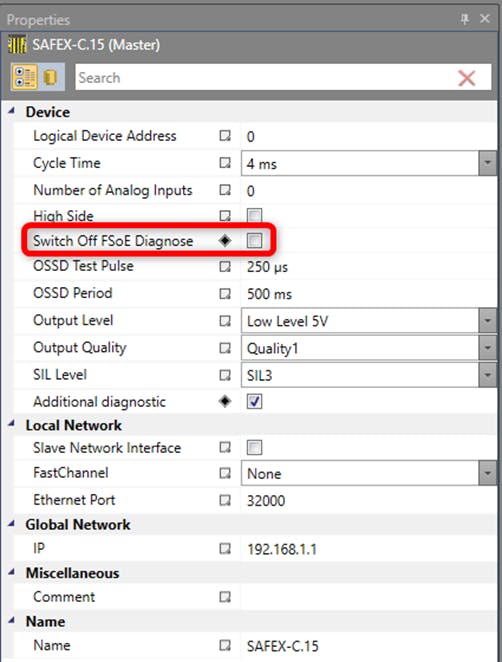
The default setting for “Switch Off FSoE Diagnose” is checked in the properties of the SAFEX-C.1x:
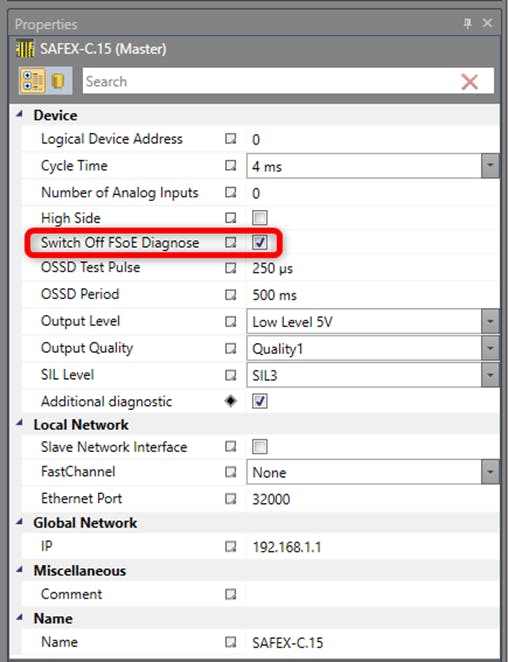
To activate FSoE Device Diagnostics uncheck “Switch Off FSoE Diagnose” in the properties of the SAFEX-C.1x then connect to the SAFEX-C1.x and download the safety program with the new setting:
Example Alarms
Example 1
In this example after activating FSoE Device Diagnostics, "Alarm A7612 Invalid FSoE Slave address" can be seen in the status line of ctrlX SAFETY Engineering:

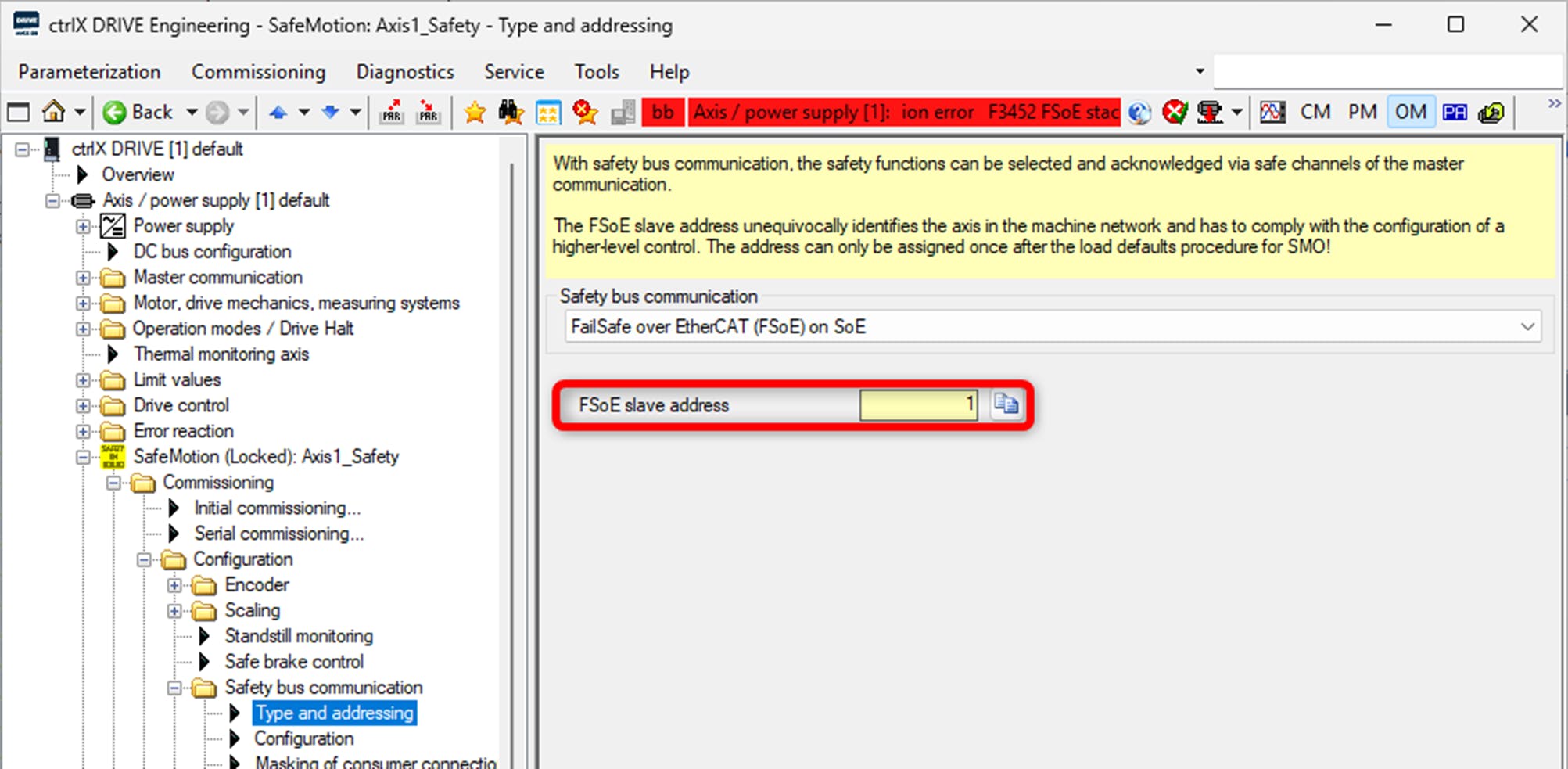
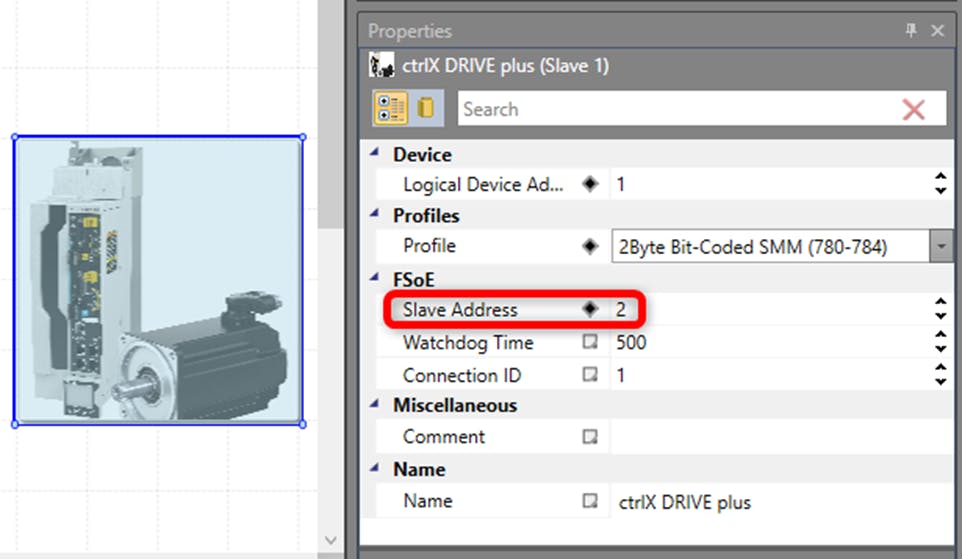
The cause was the FSoE address in the ctrlX DRIVEplus was set to 1 and in ctrlX SAFETY Engineering was set to 2:
ctrlX DRIVEplus setting:
ctrlX SAFETY Engineering setting:
Example 2
In this example after activating FSoE Device Diagnostics, "Alarm A7622 Invalid FSoE parameter data application" can be seen in the status line of ctrlX SAFETY Engineering:

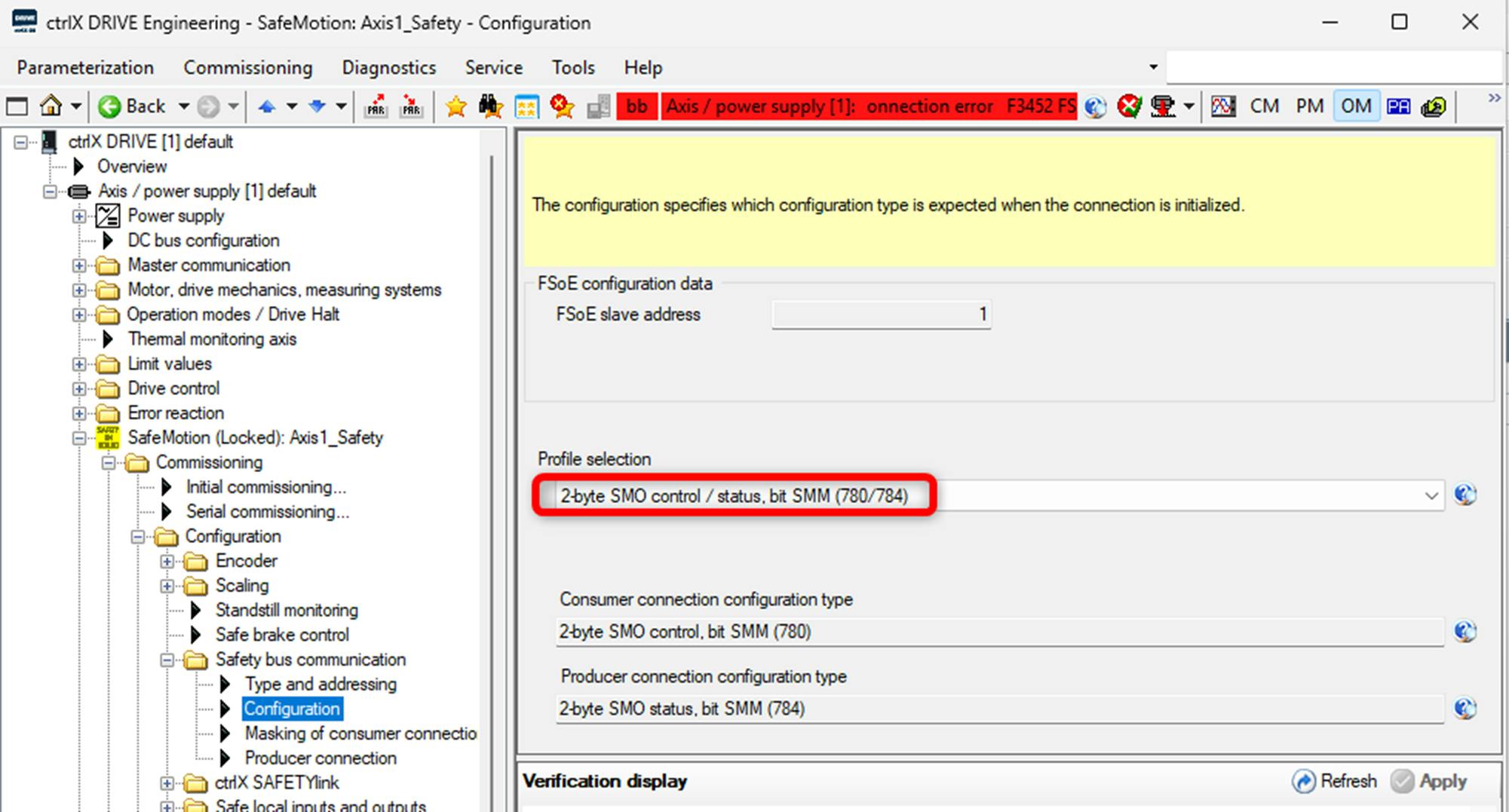
The cause was the profile in ctrlX DRIVEplus was set to 2Byte SMO control/status bit SMM (780/784) and in ctrlX SAFETY Engineering was set to 2Byte Binary-Coded SMM (781-785):
ctrlX DRIVEplus setting:
ctrlX SAFETY Engineering setting:
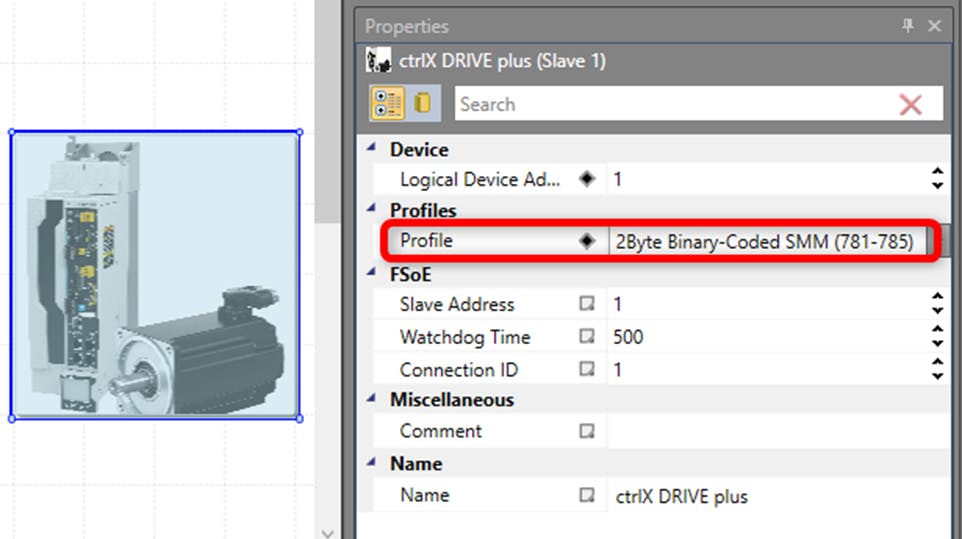
[callout type="info" text="For additional ctrlXDRIVEplus options such as profile 14 Byte Safe Values Configurable 802/813 please import the latest ctrlX DRIVE-ESI-file from the Bosch Rexroth Collaboration Room."]
Bosch Rexroth Collaboration Room
For both examples, the alarms were cleared by setting the same values in ctrlX DRIVEplus and ctrlX SAFETY Engineering.
[callout type="warning" text="NOTE: This is a diagnostic function for FSoE commissioning purposes. After startup (commissioning) when FSoE devices are communicating correctly this function needs to be switched off again (default setting) to help prevent race condition problems between different FSoE devices during bootup."]
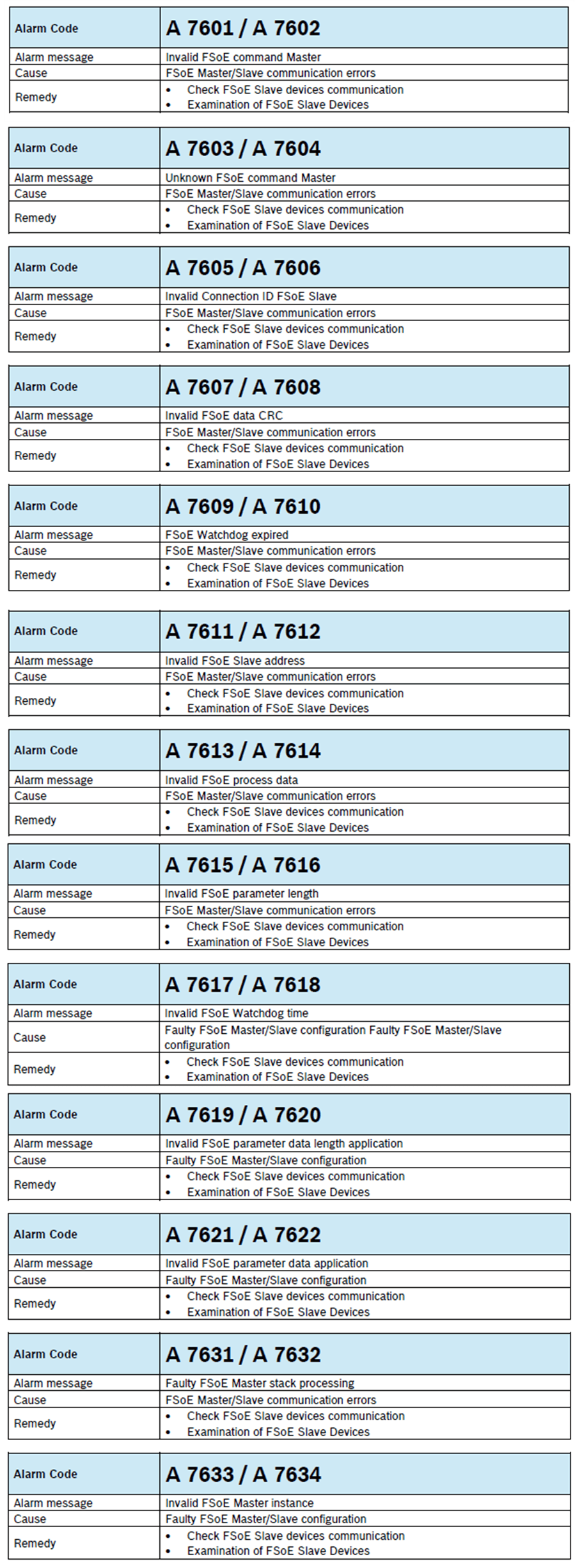
FSoE Diagnostics A76xx Alarm Overview
Additional Resources
ctrlX SAFETY Programming Manual R911405647, DOK-XSAFE*-SAFEX-C.1XC-PR03-EN-P
ctrlX SAFETY Error list and diagnostic messages R911406843, DOK-XSAFE*-SAFEX-C.1XC-RE06-EN-P